Instagram DM Booking Automation: From Reply to Booked Call
Instagram DM booking automation works best when the bot offers 2-3 near slots inside the 24-hour window, collects email, and lets Cal.com send reminders.
Instagram DM booking automation works when the bot offers two or three of your nearest open slots inside Meta's 24-hour messaging window, captures an email address while the lead is still talking, and hands confirmations and reminders to your scheduler (Cal.com, Calendly) by email or SMS. That applies to coaches, creators, studios and service businesses that get inbound DMs, comment replies or Click-to-Direct ad conversations. The main caveat: Instagram does not let you send an automated DM reminder days after the conversation went quiet, so any flow that relies on "we'll remind them in the DM" will either break the rules or simply fail to send.
Most guides stop at "send the booking link." This one covers what comes after: which slots to offer, where reminders live, and how to attribute the booking.
How does Instagram DM booking automation work?
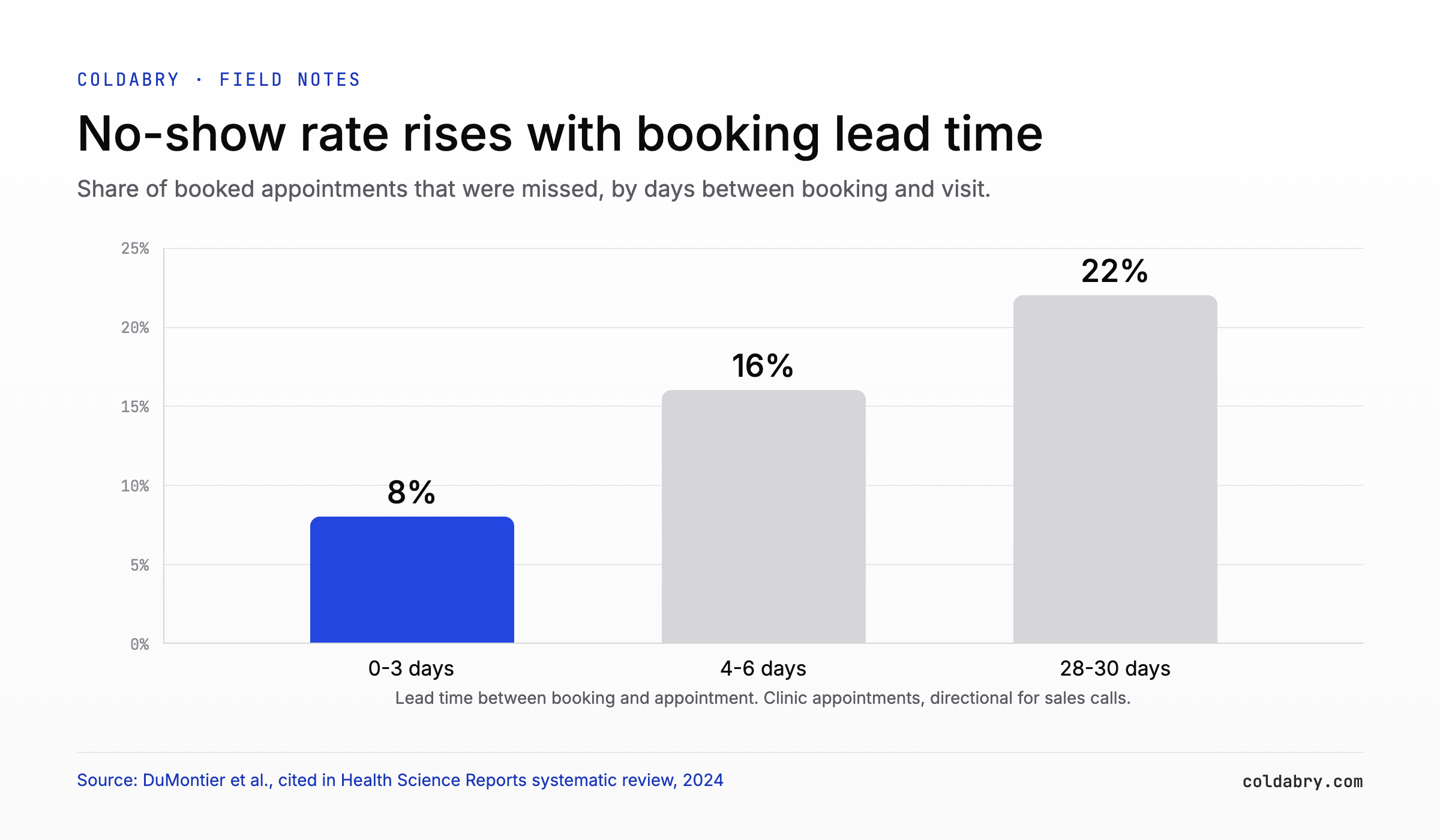
A working flow has five steps, each owned by a different system.
- Trigger. A person messages you, replies to a story, comments a keyword on a post, or taps a Click-to-Direct ad. The Instagram Messaging API delivers the event to your bot tool.
- Qualify in one or two questions. What they need and roughly when. More than two questions and people drift away mid-chat.
- Offer the nearest two or three slots. Pulled live from your scheduler's availability, not a link to a month-wide calendar.
- Collect email and book. The lead taps a slot (or a prefilled booking link) and the scheduler creates the event. Email is the field that makes everything after this step possible.
- Confirm in the DM, remind off Instagram. A confirmation goes out in the chat while the window is open. Reminders 24 hours and 1 hour before go out from the scheduler by email or SMS.
SetSmart says its AI setter "asks qualifying questions, handles objections, and proposes calendar slots", and InstantDM's guide for photographers recommends keyword triggers like "PRICE" or "WEDDING" that send booking links. Neither spells out step 5, where the platform rules bite.
If you want the qualification step handled by a model rather than a decision tree, that is the job of AI agents that qualify and book inbound leads, and the plumbing for the bot itself is covered in our guide to building the DM bot itself in n8n.
What Instagram's 24-hour window means for booking and reminders
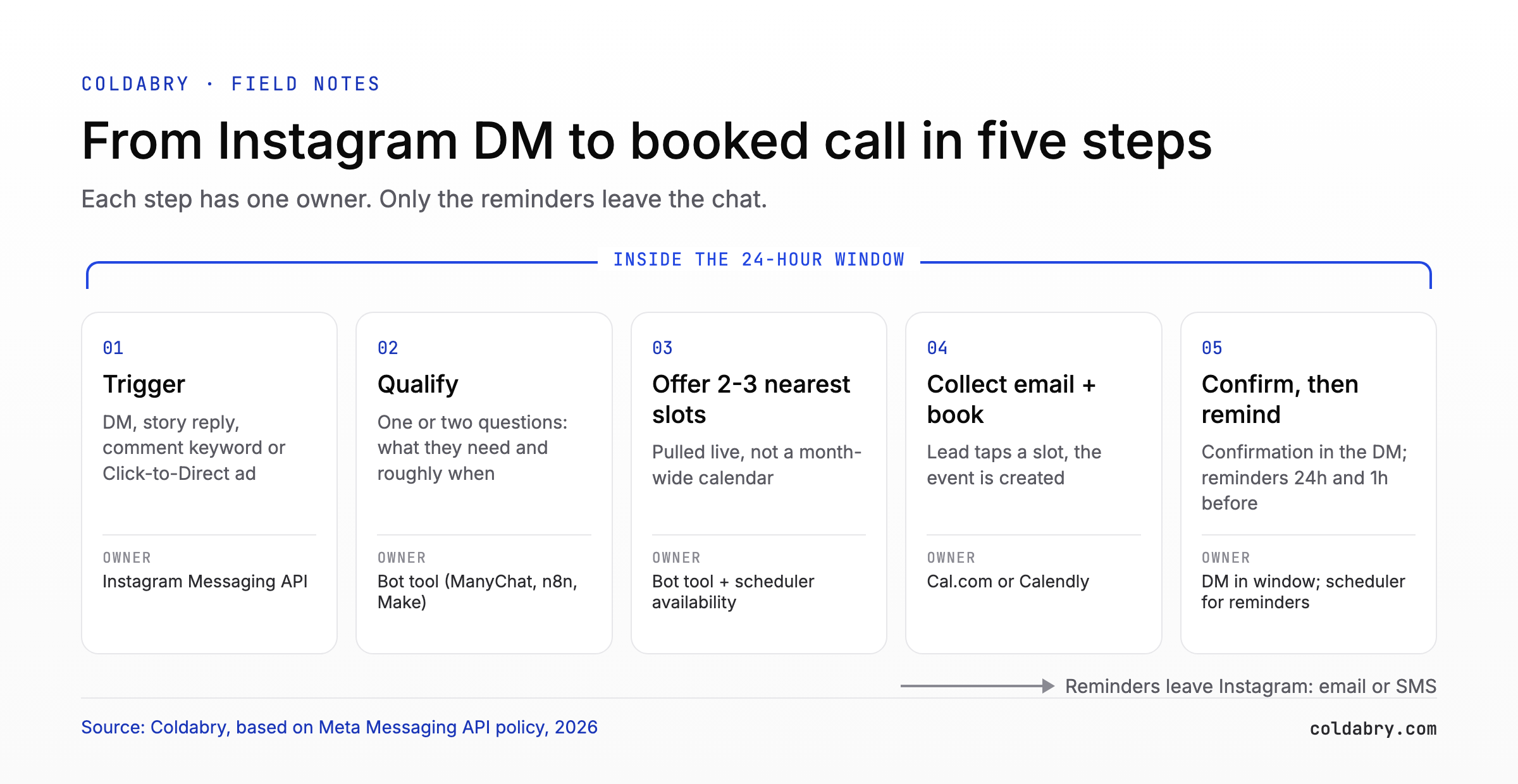
According to the Messenger Platform and Instagram Messaging API policy overview, businesses "must respond to users within the standard messaging window," and "for most user actions, it lasts 24 hours." Each new message from the lead restarts it.
The same page lists the exceptions that matter for booking:
| Situation | How long you can message | What it means for booking |
|---|---|---|
| Standard DM or story reply | 24 hours from the user's last message | Offer slots, confirm, nudge once, all inside this window |
| First message after a Click-to-Direct ad | "Up to 7 days from that message" | More room for a follow-up, still not enough for a reminder before a call two weeks out |
| Private reply to a comment | "Within seven days of the referenced user action" | Comment-keyword flows must open the DM within 7 days of the comment |
| Human Agent tag | A separate 7-day period, for a person replying manually | Cannot carry automated reminders |
| One-Time Notifications | Not available for the Instagram Messaging API | No opt-in "remind me" message on Instagram |
The One-Time Notification point comes from the French version of the same policy page, which states that one-time notifications "ne sont pas disponibles pour l'API Instagram Messaging." Put the rows together and the consequence is plain: if someone books a call for Friday on a Monday and stops replying, there is no compliant way for your bot to send an Instagram reminder on Thursday.
That is why the flow must capture email before or during booking. Interakt's appointment guide recommends reminders "24 – 48 hours" before an appointment, which is sensible advice, but on Instagram those reminders usually fall outside any open window. Send them from the scheduler instead.
Two more lines from the policy are useful. Messages inside the window "may contain promotional content," so a slot offer is fine. And where the law requires it, "automated chat experiences must disclose that a person is interacting with an automated service." For the broader limits, see what the Instagram Messaging API can and can't do, and for how ad-started conversations differ, our comparison of Click-to-Direct ads and the 7-day window.
Why offering the nearest slots cuts no-shows
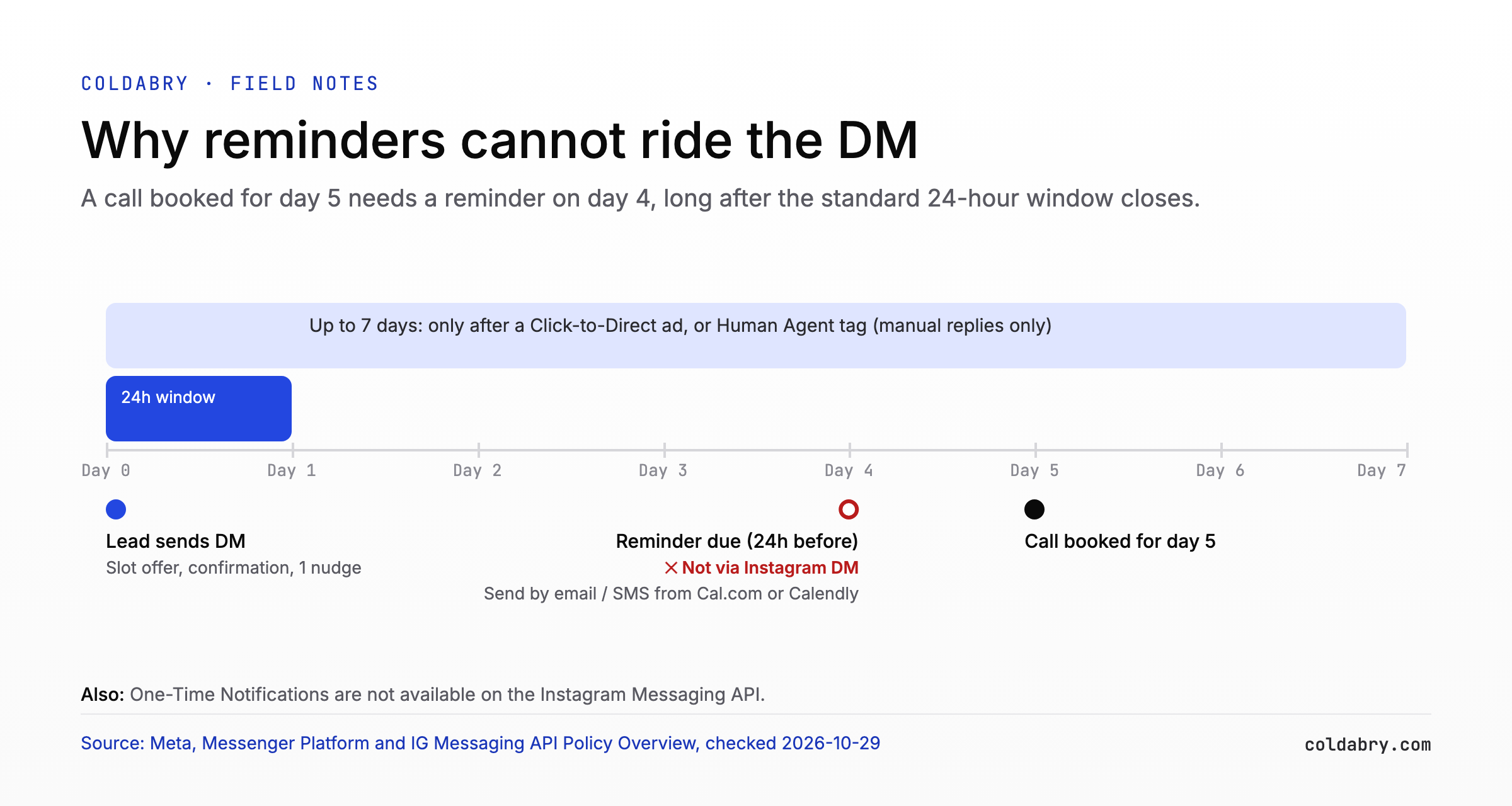
The longer the gap between booking and appointment, the more people do not show up. The best public evidence comes from healthcare scheduling research, not sales calls, so treat it as directional. A 2024 systematic review in Health Science Reports cites DuMontier et al.: lead times of 0-3, 4-6 and 28-30 days had no-show rates of 8%, 16% and 22%. The same review reports that after a family medicine practice moved to same-day (open access) scheduling, no-show rates fell from 30% to 17% in one group and from 10% to 7% in the other. The authors' summary: successful open access "decreases the no-show rate by reducing the lead time."
For a DM flow, the rule is simple: offer the nearest two or three open slots as tappable options. A full monthly calendar invites a date three weeks out, the band with the highest no-show rate in that data.
Worked example (our calculation, assumed numbers). Assume your DM flow produces 100 booked calls a month and each call that happens is worth $300 to you in expected revenue. Apply the two ends of the clinic data:
| Scenario | No-show rate | Calls that happen | Value at $300 per call |
|---|---|---|---|
| Most bookings within 0-3 days | 8% | 92 | $27,600 |
| Most bookings 28-30 days out | 22% | 78 | $23,400 |
| Difference | 14 points | 14 calls | $4,200 a month |
The arithmetic: 100 × (1 − 0.08) = 92 and 100 × (1 − 0.22) = 78; 14 × $300 = $4,200. Your rates will differ; the shape will not. If no near slot is free, offer a waitlist or a shorter call sooner.
ManyChat, Cal.com, Calendly, n8n or Make: which stack for DM-to-booking?
Pick the stack by two questions: does the booking come back to you as a webhook, and who sends the reminders. The table draws on public vendor documentation; check current plan pages before you commit.
| Tool | Role in the flow | Booking inside chat or link-out | Booking webhook | Who sends reminders | Caveat |
|---|---|---|---|---|---|
| ManyChat | Instagram bot, keyword triggers, slot buttons | Calendly works as a link-out according to SetSmart | Via its integrations or external webhook tools | Scheduler, not ManyChat, once outside the window | Cal.com not listed as a native integration per SetSmart |
| Cal.com | Scheduler and availability | Link-out or prefilled link sent by the bot | Yes, on all plans including free, according to InstantDM | Cal.com email workflows | Open source and self-hostable |
| Calendly | Scheduler and availability | Link-out | Plan-gated, according to InstantDM | Calendly email or SMS reminders | Verify webhook access on your plan |
| n8n | Glue: availability lookup, slot buttons, webhook matching | Can render slots as buttons in the DM | Receives scheduler webhooks | Can trigger email/SMS through your provider | Self-hosting means you own uptime |
| Make | Glue, hosted | Same as n8n via scenarios | Receives scheduler webhooks | Through connected email/SMS modules | Usage-based operations add up at volume |
A few practical notes:
- ManyChat plus Calendly is the fastest to set up, but it is a link-out: the lead leaves the chat to finish booking. That is where some drop off, and you lose the in-chat moment to ask for an email first. If you are weighing ManyChat's tiers, see ManyChat pricing and alternatives.
- Cal.com is attractive here because InstantDM describes it as "open-source ... like Calendly, but self-hostable and free" and its booking webhook is available without an upgrade. InstantDM's setup goes through Settings, Developer, Webhooks, trigger "Booking Created", then reads the attendee email and start time from the payload and looks up the Instagram user by email.
- n8n or Make sit in the middle when you want slot buttons in the DM instead of a raw link, or when you need to write the booking to a CRM. That is the same territory as custom booking and integration automation: availability lookups, webhook matching, retries and reporting.
Message templates for slot offer, confirmation and follow-up
Copy these and swap the brackets. Every message is sent inside an open window.
Templates (copy-ready, inbound DMs only): send A when the conversation starts, B right after, C as soon as you know what they need, D before or as part of booking, E immediately after the booking webhook fires, F once if they stop replying.
- A. Opening with bot disclosure: "Hi [first name], thanks for reaching out! You're chatting with [brand]'s automated assistant. I can get you booked in about a minute, and a person from the team reads every conversation."
- B. One qualifying question: "What would you like help with: [option 1], [option 2] or something else?"
- C. Slot offer with fallback: "Great, a [length]-minute [call type] is the right next step. The nearest open times are: [Tue 10:00], [Tue 15:30], [Wed 09:00] ([time zone]). Tap one, or reply 'none work' and I'll find another time."
- C2. If they reply "none work": "No problem. Are mornings or afternoons better for you this week? I'll send the next three options that fit."
- D. Email capture: "Perfect. What's the best email for the calendar invite and reminder? We'll send the confirmation and a reminder there, since Instagram won't let us message you about it later."
- E. Confirmation in the DM: "You're booked for [day, date] at [time] ([time zone]) with [host]. The invite is on its way to [email]. Need to change it? Use the reschedule link in that email."
- F. One in-window nudge (send within 24 hours of their last message, once): "Hi [first name], still want that [call type]? The nearest open times are [slot] and [slot]. Tap one and you're set."
Rules for the set:
- Message A includes the automated-service disclosure where the law requires it; it costs nothing to include everywhere.
- Message C shows times in the lead's time zone, never "next available."
- Message D explains why you need the email, so it does not read as a data grab.
- Message F goes out once, inside the window, and never after it closes.
- Reminders (24 hours and 1 hour before) are set up in the scheduler, by email or SMS.
- Every booking link carries a reference to the source (see next section).
How to attribute a booking to the Instagram conversation
Without attribution you know how many calls were booked, not which post, keyword or ad produced the calls that happened. The fix is a reference that travels from the DM into the booking and back.
- Tag the trigger. Each entry point gets a short ref: the comment keyword, the post ID, the ad ID, or "story_reply".
- Pass the ref in the booking URL. Most schedulers accept URL parameters for prefill or tracking; check your scheduler's URL parameter docs for the exact field names before you build. Prefill the email too if you captured it in message D.
- Receive the booking webhook. On Cal.com that is the Booking Created trigger described in InstantDM's integration guide.
- Match it back. Match on the ref first, email second, and write one record per booking to your CRM or a sheet.
- Mark attendance. After the call, set "showed" to yes or no, manually or from your meeting tool.
- Report by source. DM started, booked, showed, per ref. That last column tells you which content produces calls, not just conversations.
The record we would keep for each booking:
| Field | Example value | Where it comes from |
|---|---|---|
| ig_user_id | Instagram-scoped user ID | Messaging API webhook |
| trigger | comment_keyword | Your bot flow |
| ref | post_reel_0412 or ad_id | Booking URL parameter |
| booked_at | Timestamp of booking | Scheduler webhook |
| start_time | Timestamp of the call | Scheduler webhook payload |
| showed | yes / no | Marked after the call |
Add the gap between booked_at and start_time as a computed column: it shows how far ahead your calendar should open.
What not to automate (and where it breaks Instagram rules)
Rule of thumb: automate replies to people who messaged you first; never automate the first message to people who did not.
Cold DMs to non-followers sent by software are against Instagram's terms and put the account at risk. See our review of Instagram cold DM tools and their risks for the details. Everything in this guide assumes an inbound or opt-in start: a DM, a story reply, a comment keyword answered by private reply within seven days, or a Click-to-Direct ad.
The second trap is message tags. The policy page describes the Human Agent tag as a way for businesses "to manually respond to user messages within a separate 7-day period." Using it to push automated reminders is outside the approved use case, and the policy warns that using tags outside approved use cases may lead to restrictions on your ability to send messages.
| Do | Don't |
|---|---|
| Reply automatically to inbound DMs and comment keywords | Send automated first messages to people who never contacted you |
| Offer slots and confirm inside the 24-hour window | Send slot offers or reminders after the window closes |
| Send reminders by email or SMS from the scheduler | Use the Human Agent tag for automated reminders |
| Disclose the automated assistant in the first message | Pretend the bot is a named team member |
| Hand off to a person when the lead asks something unusual | Keep a lead in a loop of bot questions |
If you are deciding whether to use Meta's own tooling for the conversational part instead of a third-party setter, our breakdown of Meta's own business agent vs AI DM setters covers that choice. Coldabry builds custom automations and agents like this flow for teams that want to own them.
FAQ
Can you book an appointment without leaving Instagram DMs?
Partly. With a glue tool like n8n or Make reading your scheduler's availability, a bot can show the nearest open times as buttons and create the booking when the lead taps one. Simpler setups, such as ManyChat with Calendly, work as a link-out: the lead finishes on a booking page in the browser. Either way, confirmation can go in the DM while the 24-hour window is open, but later reminders need email or SMS.
Does ManyChat integrate with Cal.com?
According to SetSmart's overview of ManyChat integrations, Calendly works with ManyChat as a link-out and Cal.com is not listed as a native integration. You can still connect them: the bot sends a Cal.com booking link, and Cal.com's booking webhook, which InstantDM says is available on all plans including free, notifies an automation tool such as n8n or Make. That tool matches the booking to the Instagram contact by a reference in the link or by email.
Can I send appointment reminders through Instagram DMs?
Usually not with automation. Meta's policy gives businesses a standard 24-hour window after the user's last message, extended to up to 7 days only after a Click-to-Direct ad. One-Time Notifications are not available for the Instagram Messaging API, and the Human Agent tag is for manual replies by a person. Send reminders by email or SMS from Cal.com or Calendly instead, which is why the DM flow should collect an email address.
Is Instagram DM booking automation against Instagram's rules?
Automating replies to people who contacted you first is allowed through the official Instagram Messaging API, within its messaging windows and policies. What breaks the rules is cold outreach: software that sends first messages to people who never messaged you, commented or clicked your ad. Also avoid misusing message tags, which Meta says can lead to messaging restrictions, and disclose that the lead is talking to an automated service where the law requires it.
How far out should I offer booking slots to reduce no-shows?
As close as your calendar allows. Clinic research cited in a 2024 systematic review found no-show rates of 8% for appointments booked 0-3 days ahead, 16% at 4-6 days and 22% at 28-30 days. Sales calls are not clinic visits, so treat this as directional. In practice, offer the nearest two or three open slots within the next few days instead of a full monthly calendar, and track the gap between booking and call in your own data to find your threshold.