Instagram DM Automation With n8n: A Build Guide (2026)
Build Instagram DM automation in n8n: Meta app, permissions, a Webhook node that passes verification, replies inside the 24-hour window, and template fixes.
Yes, Instagram DM automation with n8n works, but only as replies: you connect a Meta app holding the instagram_business_manage_messages permission to an n8n Webhook node, and an HTTP Request node answers through graph.instagram.com within 24 hours of the user's last message (Meta, Send Messages). This applies to Instagram Business and Creator (professional) accounts. The main caveat: the API cannot start a conversation with someone who never interacted with you. It can only reply to a DM, or send one private reply to a comment within 7 days (Meta, Private Replies). Bots that cold DM people through a logged-in session break Instagram's terms.
What can Instagram DM automation with n8n actually do?
Your workflow can only message people who contacted the account first, by DM or by commenting. Meta's documentation is explicit: "Only after an Instagram user has sent your app user's Instagram professional account a message can your app send a message to the Instagram user" (Meta, Send Messages). The standard window lasts 24 hours for most user actions, and up to 7 days when the first message follows a Click-to-Direct ad. A human (not a bot) can tag a reply to use a separate 7-day Human Agent window.
Text must be UTF-8 and 1000 bytes or less; group messaging is not supported. For the complete rule set, read our full Instagram Messaging API rules.
| Action | Allowed via the API? | Limit |
|---|---|---|
| Reply after the user messages you | Yes | 24-hour standard window |
| Reply after a Click-to-Direct ad message | Yes | Window may last up to 7 days |
| Private reply to a comment | Yes | One reply per comment, within 7 days of the comment |
| Human agent reply, tagged | Yes | 7-day Human Agent window, real person only |
| Send the first message (cold DM) | No | User must write first |
| Group chats | No | Not supported |
| Text message | Yes | UTF-8, 1000 bytes or less |
| Image (png, jpeg) | Yes | 8MB |
| Video (mp4, ogg, avi, mov, webm) | Yes | 25MB |
| Audio (aac, m4a, wav, mp4) | Yes | 25MB |
| File (pdf) | Yes | 25MB |
Source: Meta for Developers, Instagram API with Instagram Login, Send Messages and Private Replies, checked 2026-10-24.
Which Meta app setup and permissions does n8n need?
There are two official routes, and most tutorials mix their names up. The newer Instagram API with Instagram Login uses an Instagram User access token and the graph.instagram.com host. The older Instagram API with Facebook Login uses graph.facebook.com, and the Instagram account must be linked to a Facebook Page (Meta, Instagram Webhooks). For a new n8n build, the Instagram Login route is simpler because no Page is involved.
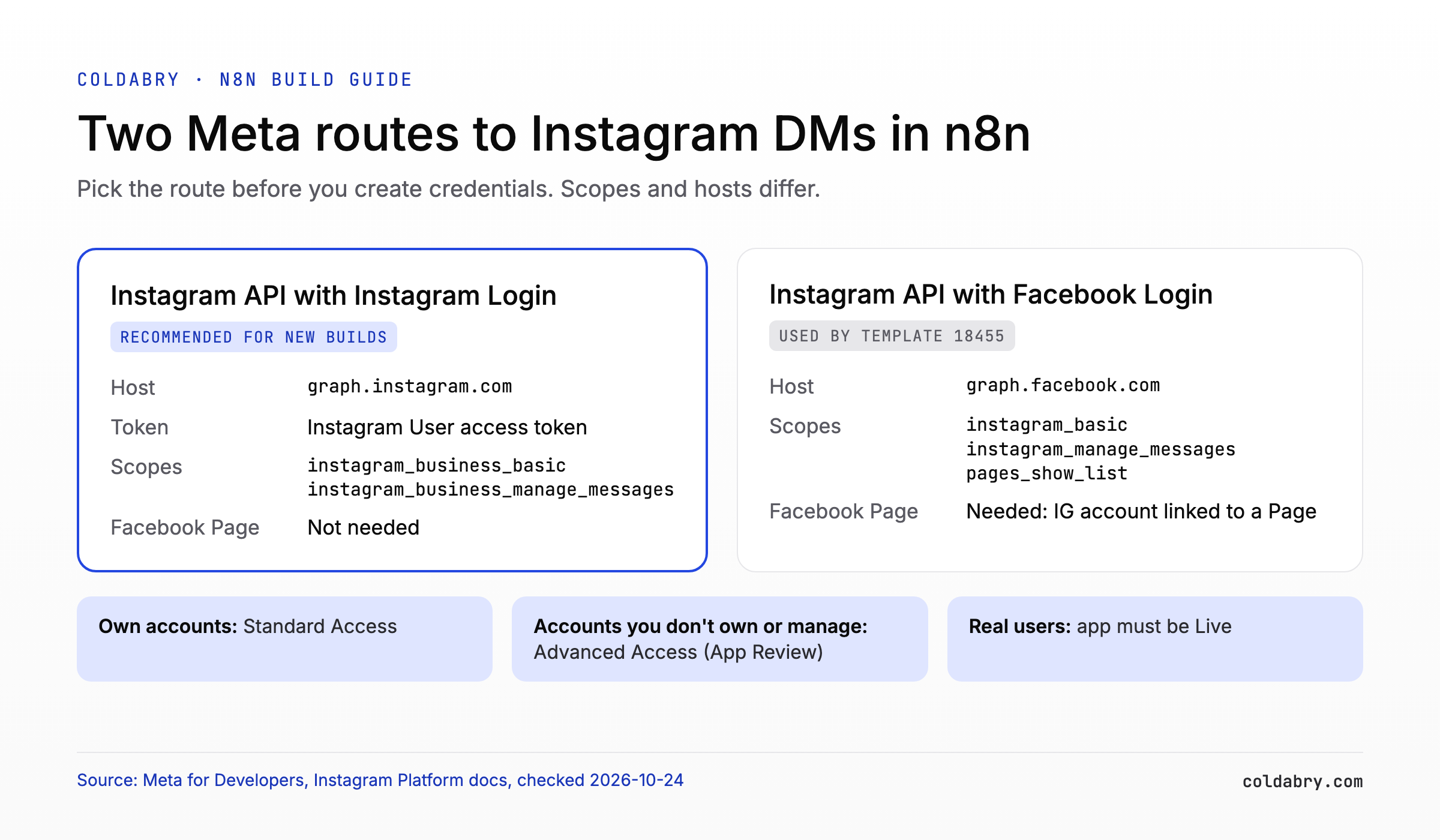
The setup, in order:
- Create a Meta app in the App Dashboard and add the Instagram product.
- Connect the Instagram professional account (Business or Creator) you want to automate.
- Generate an Instagram User access token "requested from a person who can send a message from the Instagram professional account" (Meta, Send Messages).
- Request the scopes
instagram_business_basicandinstagram_business_manage_messages. - Pick the access level. Standard Access covers accounts you own, manage or have added in the App Dashboard. Advanced Access, which means App Review, is required if your app serves professional accounts you don't own or manage. Some features may not work until Advanced Access, and comment webhooks always require it.
- Add testers properly. Meta requires that testers "have a role on your app, grant your app access to all the required permissions, and have a role on the Instagram professional account that owns the app."
- Publish the app. "Your app must be published or Live to receive notifications for app users" (Meta, Webhooks setup).
For client accounts, step 5 decides the project: Advanced Access is a review, not a toggle. If you outgrow n8n, the human side can move into a custom inbox app built around the agent handoff; the Meta rules stay the same.
How to set up the n8n Instagram webhook (and pass Meta's verification)
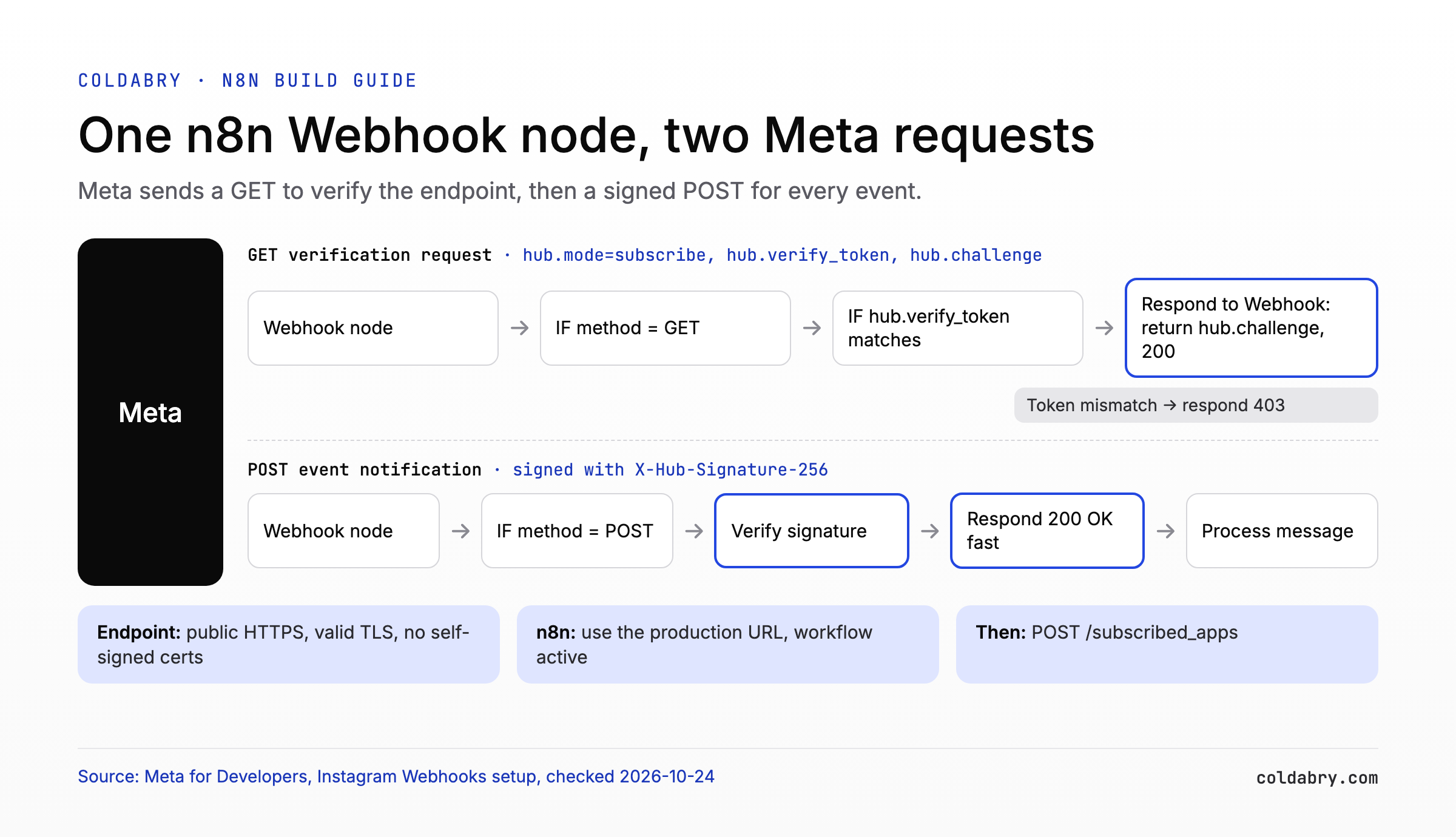
Meta talks to your webhook in two ways, and your workflow must handle both. The first is a verification request: Meta sends a GET with hub.mode=subscribe, hub.verify_token and hub.challenge in the query string. You check that hub.verify_token matches the string you typed in the Verify Token field, then respond with the hub.challenge value (Meta, Webhooks setup). The second is the event itself, a POST with the message payload.
Some tutorials say Instagram only sends POST and n8n answers verification automatically. Meta's docs describe a GET handshake you must echo back:
- Webhook node: set it to accept both GET and POST (or use two Webhook nodes on the same path), with response mode "Using Respond to Webhook node".
- IF node: route on the request method.
- GET branch: an IF checks
hub.modeequalssubscribeandhub.verify_tokenequals your secret, then a Respond to Webhook node returnshub.challengeas plain text with status 200. A mismatch returns 403. - POST branch: the event pipeline from the next sections.
Four details break verification. Meta needs a public HTTPS URL with a valid certificate, because "Self-signed certificates are not supported." Use the n8n production URL, not the test URL, and activate the workflow before you click Verify; the popular template 14026 says the same: "Activate the workflow in production mode first" (n8n.io template 14026). Finally, subscribe the fields you need (messages, messaging_postbacks, messaging_reactions and others) and send a POST to the account's /subscribed_apps edge with the Instagram User token, which returns {"success": true}.
How to send the reply from n8n
Sending is one HTTP Request node. Every endpoint lives on graph.instagram.com, and the send endpoint is /<IG_ID>/messages or /me/messages, with two required parameters: recipient holding the user's Instagram-scoped ID (IGSID) and message holding the content (Meta, Send Messages). The IGSID arrives in the webhook payload, since the notification "contains the Instagram user's Instagram-scoped ID and their message."
Example JSON body for the HTTP Request node, using an n8n expression for the sender ID:
{
  "recipient": { "id": "{{ $json.sender_id }}" },
  "message": { "text": "{{ $json.reply_text }}" }
}
This assumes an earlier Set node maps entry[0].messaging[0].sender.id from Meta's payload to sender_id.
| Setting | Value | Why |
|---|---|---|
| Method | POST | Send API takes POST |
| URL | https://graph.instagram.com/v26.0/<IG_ID>/messages | Instagram Login host, version from Meta's samples |
| Authentication | Header Auth credential: Authorization = Bearer <token> | Token stays in n8n credentials, not in workflow JSON |
| Content-Type | application/json | Matches Meta's curl sample |
| Body: recipient.id | IGSID from the webhook event | Required parameter |
| Body: message.text | Reply text, 1000 bytes or less | Meta's text cap |
Source: Meta for Developers, Send Messages, checked 2026-10-24.
Expect one side effect: webhook-delivered messages are not marked Read in the Instagram app until a reply is sent.
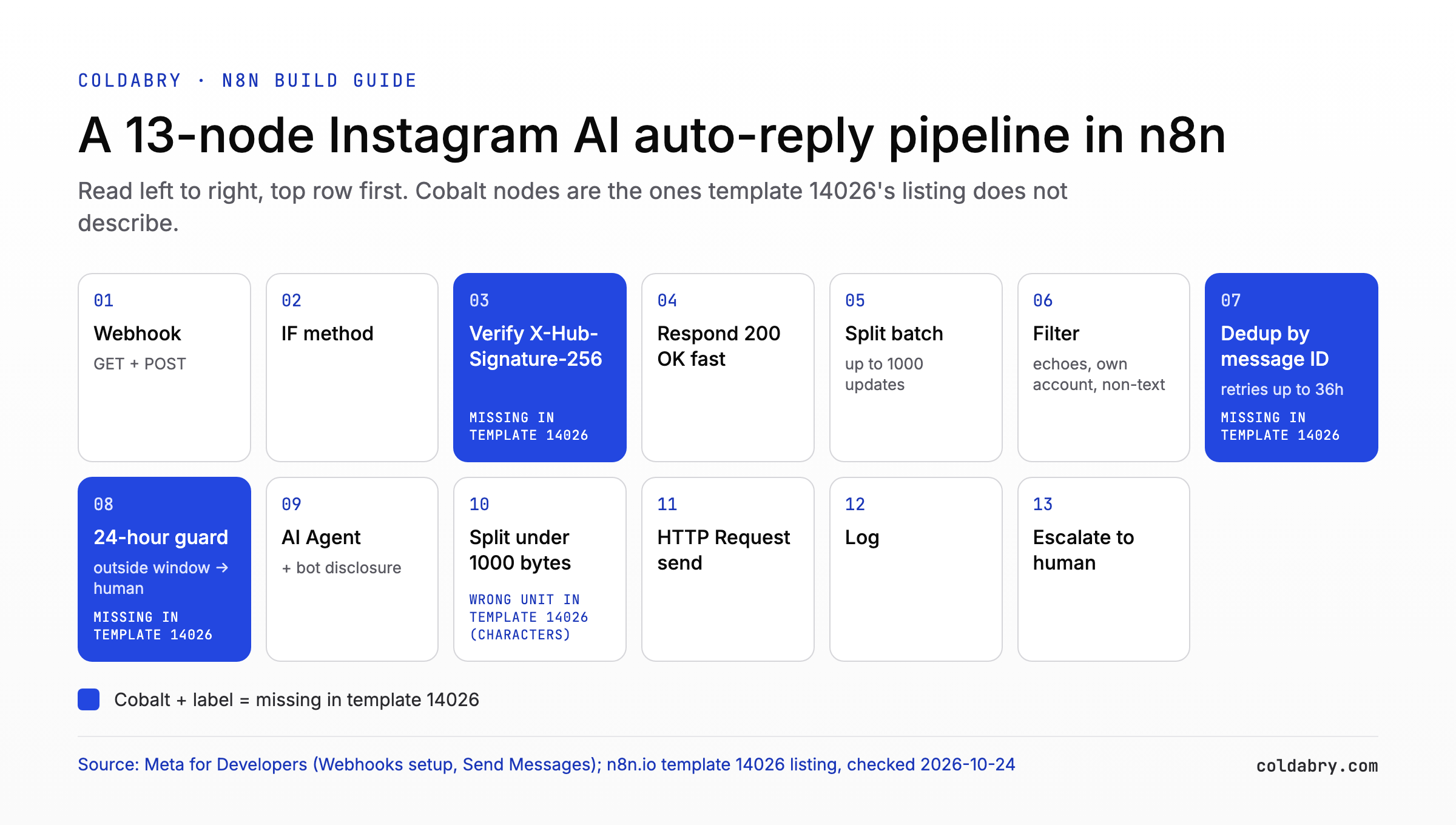
Buildable workflow: an n8n Instagram auto-reply with AI, node by node
A production-ready checklist, with the hygiene most tutorials skip: signature checks, fast acknowledgement, dedup, loop filtering and a 24-hour guard.
- Webhook (GET and POST, response via Respond to Webhook node, production URL, workflow active).
- IF: method. GET goes to the verification branch from the previous section. POST continues.
- Code: verify
X-Hub-Signature-256. Meta signs every payload with SHA256 and puts the signature in that header, prefixed withsha256=. "You don't have to validate the payload, but you should" (Meta, Webhooks setup). Compute an HMAC-SHA256 of the raw request body with your App Secret and compare. Mismatch: stop. - Respond to Webhook: 200 OK, immediately. Meta expects
200 OK HTTPSfor every notification. Acknowledge first, do the slow AI work after. - Split the batch. Notifications can arrive in batches of up to 1000 updates, but batching is not guaranteed, so loop over each entry and handle every message on its own.
- Filter. Drop echoes of your own replies (
is_echo), events sent by your own account and non-text messages you don't support yet. Without this, the bot answers itself in a loop. - Dedup by message ID. If a delivery fails, Meta retries "over the next 36 hours" and says "Your server should handle deduplication." Store processed message IDs in a Data Table, sheet or database and skip repeats.
- 24-hour guard. Save the time of each user's last inbound message. If the reply would go out after 24 hours, do not send it automatically; route the thread to a human, who can use the Human Agent tag within 7 days.
- AI Agent node. Any LLM with your instructions and a short conversation memory. In the first reply, disclose the bot: Meta states that where law requires it, automated chats must disclose this "at the beginning of any conversation or message thread," and names California and German users as examples, with the sample line "You are talking to a bot" (Meta, Send Messages).
- Code: split under 1000 bytes. Measure bytes, not characters (see the worked example below).
- HTTP Request: send each chunk, as configured in the previous section.
- Log inbound text, reply, model used and status code to a sheet or database.
- Escalation. A keyword such as "human" or a low-confidence answer flags the thread and notifies your team. Meta's Handover Protocol "allows you pass the conversation from one app or inbox to another" if you run a separate inbox app.
Worked example (our calculation): how long can one chunk be? Meta caps text at 1000 bytes in UTF-8. Plain ASCII uses 1 byte per character, so 1000 characters is the ceiling. Accented letters such as Polish ą or ł use 2 bytes, so a text made only of them fits 1000 / 2 = 500 characters. Most single emoji use 4 bytes, so 1000 / 4 = 250 of them; combined emoji (flags, families, skin tones) take more. A full 2000-character chunk is at least 2000 bytes, twice the cap. In the Code node, measure with Buffer.byteLength(text, 'utf8') and cut at the last space before 1000 bytes.
Steps 7, 8 and 13 are the hardest in a DIY build, because they need state and a place for humans to work. That is the point where custom AI automation for inbound DM workflows or AI agents that hand off to a human can be worth more than another template. If you are still choosing between a no-code tool and your own build, compare ManyChat pricing and alternatives and our notes on building vs buying an Instagram bot.
Are n8n Instagram DM templates on n8n.io and GitHub any good?
They are a good start and a weak finish. Template 14026, "Auto-reply to Instagram DMs with an AI chatbot and Google Gemini history," handles webhook verification and incoming events, filters to text-only messages and blocks "bot reply-backs from the page itself" (n8n.io template 14026). It keeps a 15-message history and deletes older rows. Those parts are solid.
Two things need fixing. Replies are "split into chunks of up to 2000 characters," which can exceed Meta's 1000-byte text cap even in plain English. And the setup asks you to paste the long-lived access token into the Set Context node, so the token sits in the workflow JSON instead of n8n credentials, and travels with every export or shared copy. Neither template listing mentions a signature check.
Template 18455, which replies to comments and sends DMs, per its listing asks for a long-lived token with instagram_basic, instagram_manage_comments, instagram_manage_messages and pages_show_list, and ignores events from your own account to prevent loops (n8n.io template 18455). Its DM step uses Meta's private reply to the comment (recipient.comment_id), which Meta allows once per comment within 7 days, and it calls Graph API v23.0. Those are Facebook Login permission names, so it belongs to the Page-linked route. Comment triggers also need Advanced Access, and the account must be public: "Private accounts do not receive comment or mention notifications" (Meta, Webhooks setup).
Audit GitHub repos of exported workflows the same way, checking commit date and API host.
| Check | What good looks like | Template 14026 |
|---|---|---|
| API route | Matches your app: graph.instagram.com or graph.facebook.com | Instagram Graph API |
| GET verification | Returns hub.challenge after token check | Handled |
| Signature check | X-Hub-Signature-256 verified with App Secret | Not listed |
| Echo / own-account filter | Drops the bot's own messages | Handled |
| Dedup | Message IDs stored, retries skipped | Not listed |
| Message length | Split by bytes, under 1000 | 2000 characters, fix needed |
| Token storage | n8n credentials | Set node, fix needed |
| 24-hour guard | No automated send outside the window | Not listed |
| Bot disclosure | First reply says it is automated | Not listed |
| Freshness | Recent update, current API version | Last update about 7 months before 2026-10-24 (per listing) |
Source: our audit of the public listing at n8n.io/workflows/14026, checked 2026-10-24. "Not listed" means the listing does not describe it.
Can you automate cold Instagram DMs with n8n?
No, not through the official API, because the API only lets you message someone who wrote to the account first or commented on your content (Meta, Send Messages). Workflows that promise cold DMs from n8n rely on unofficial tools that log in as you or script the app. Instagram's Terms of Use forbid "accessing or collecting information in an automated way without our express permission, regardless of whether such automated access or collection is undertaken while logged-in to an Instagram account" (Instagram Terms of Use).
Meta's Account Integrity standard also lists "using an account or other entity through automated means, such as scripting (unless the scripting activity occurs through authorized routes...)" (Meta Community Standards, Account Integrity). In practice that means a risk of restrictions on the account you care about most. We cover that risk in detail in ban risk of cold DM tools, and recovery in appealing a suspended Instagram account.
Note: The legitimate way to "start" more DM conversations is to give people a reason to write first. Every trigger below lets your n8n workflow message the person through the API.
| Trigger | How it opens a conversation | Reply window |
|---|---|---|
| User sends a DM | Direct message to your account | 24 hours |
| Click-to-Direct ad | First message after clicking the ad | Up to 7 days |
| Comment keyword | Comment webhook (Advanced Access, public account), then one private reply via recipient.comment_id | Private reply within 7 days of the comment; 24-hour window opens if the user answers |
| Story reply | User replies to your story in DMs | 24 hours |
Source: Meta for Developers, Send Messages and Webhooks setup and Private Replies, checked 2026-10-24. Terms of Use and Account Integrity quotes checked 2026-10-09.
For the bigger picture, see agentic workflows that replace manual ops. Coldabry builds custom DM automations and AI agents that clients own, for teams that need more than a template.
FAQ
Does n8n have an Instagram node for DMs?
Not for direct messages. n8n's Facebook Trigger node has an Instagram object, but it lists comments on media, @mentions and expired stories, not DMs (n8n Docs, Facebook Trigger). For Instagram DM automation in n8n you use the generic Webhook node to receive message events from Meta and an HTTP Request node to send replies to the /messages endpoint on graph.instagram.com.
Do I need Meta App Review to automate Instagram DMs in n8n?
It depends on whose accounts the workflow serves. Meta gives Standard Access to apps that serve Instagram professional accounts you own, manage or have added in the App Dashboard, so a workflow for your own account can run without App Review. Meta notes some features may not work properly until the app has Advanced Access, and comment webhooks (needed for comment-to-DM flows) always require it. If the app serves accounts you don't own or manage, such as client accounts, you need Advanced Access, which goes through App Review (Meta, Send Messages). Either way, the app must be Live.
Can n8n reply to an Instagram DM after 24 hours?
Not automatically. The standard messaging window lasts 24 hours for most user actions, or up to 7 days when the conversation started from a Click-to-Direct ad. After that, Meta offers a separate 7-day Human Agent window, but it is meant for replies written by a person, tagged as such (Meta, Send Messages). The safe n8n pattern is the 24-hour guard node from the checklist above.
Can I use n8n Cloud or do I have to self-host?
Either works, as long as Meta can reach your webhook over HTTPS with a valid certificate; self-signed certificates are not supported (Meta, Webhooks setup). Self-hosting needs a public domain and a reverse proxy to the production URL.
Can n8n send cold Instagram DMs?
Not through the official API. Your app can only message people who messaged the account or commented on your content (one private reply within 7 days). Tools that log in as you to send cold DMs break Instagram's Terms of Use on automated access (Instagram Terms of Use).
Why does my n8n Instagram webhook fail verification?
Usually one of four things: the test URL instead of the production URL (or an inactive workflow), no hub.challenge returned on the GET, a hub.verify_token mismatch, or a self-signed certificate (Meta, Webhooks setup).