Instagram DM to CRM: Sync Leads Without Duplicates (2026)
Key every Instagram DM lead on its Instagram-scoped ID, drop Meta webhook retries, then upsert into HubSpot, GHL or Pipedrive with one owner per thread.

To push Instagram DM leads into a CRM without duplicates, key every contact on the Instagram-scoped ID (IGSID) that Meta sends in the webhook, drop repeat deliveries by message ID, then upsert (update or create, never blind create) the contact in HubSpot, GoHighLevel or Pipedrive and assign one owner per thread. This applies to Instagram professional accounts connected through Meta's official API. The main caveat: most DMs arrive without an email or phone number, so the IGSID is the only reliable key you get, and it is scoped to your account and app setup, per Meta's Instagram Messaging API docs.
Most Instagram DM to CRM setups fail quietly: one person becomes two records, two reps each see "new lead", and both reply. This guide fixes that "replied to the same person twice" problem for inbound DMs only; automating cold DMs breaks Instagram's terms.
If you still need the webhook itself, start with our guide to building the Instagram webhook in n8n. This article picks up where that one stops: identity, dedupe, per-CRM upsert and ownership.
How do you send Instagram DM leads to a CRM?
You send Instagram DM leads to a CRM through a small layer between Meta and the CRM, not by pointing the webhook straight at a "create contact" call.
The order matters. Meta's webhook guide says your endpoint should respond to every notification with 200 OK, signs payloads with SHA256 in the X-Hub-Signature-256 header ("You don't have to validate the payload, but you should"), and retries failed deliveries for up to 36 hours. So the fast path is: verify, answer 200, put the event on a queue, and do the CRM work after.
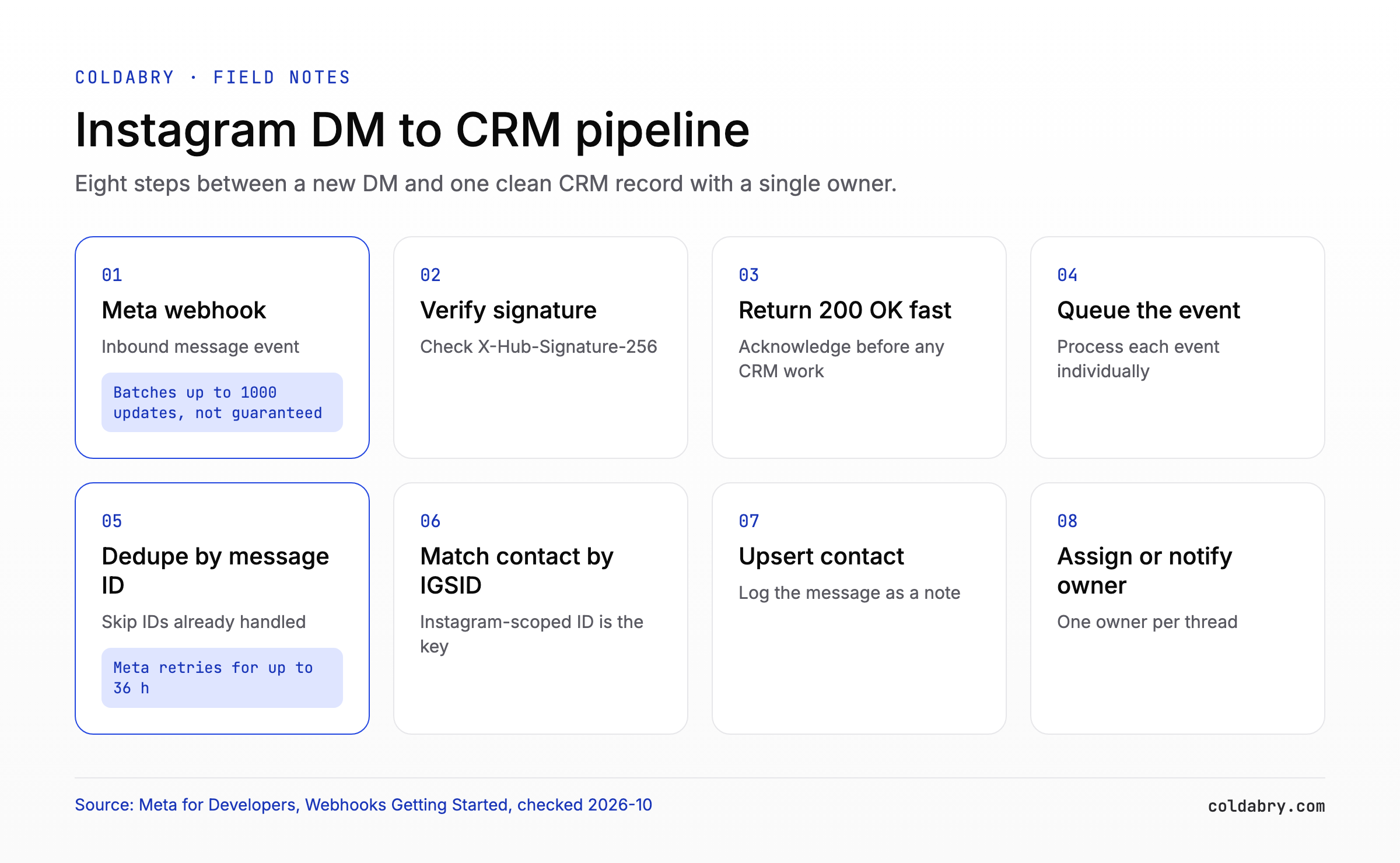
Each stage removes one failure mode: fake posts, needless retries, timeouts, repeat deliveries, split records, races and double replies.
Meta also says notifications can arrive batched, "with a maximum of 1000 updates", but batching "cannot be guaranteed", so handle each event individually (Meta).
Which ID should you match Instagram contacts on?
Match Instagram contacts on the IGSID. Each inbound message notification "contains the Instagram user's Instagram-scoped ID and their message" (Meta Messaging API), before the lead has told you anything.
| Identifier | Present on first DM? | Stable? | Good match key? | Where to store it |
|---|---|---|---|---|
| IGSID | Yes, in every message event | Stable for your account and API setup | Yes, primary key | Unique custom property / field |
| Username (@handle) | Needs an extra lookup | No, users can change it | No, display and link only | Text field, overwritten on change |
| Display name | Needs an extra lookup | No, and often not a real name | No | First/last name, editable |
| Only if the lead types it | Yes | Secondary key, for merging | Standard email field | |
| Phone | Only if the lead types it | Mostly | Secondary key, for merging | Standard phone field |
Display names are the classic trap. GoHighLevel users have reported on the vendor's ideas board that Instagram names are "usually very different to real full names", which leads to duplicates (user report, GHL Ideas).
One more rule: pick one Instagram API setup and stay on it. Meta's Instagram webhooks page says the API host, access token, account identifier and available fields "are not interchangeable" between setups (Meta Instagram Webhooks). Our breakdown of what the Instagram Messaging API can and can't do covers the two setups.
Field map for the CRM record
Fields for every contact that came from a DM (names illustrative):
| Field | Type | Purpose |
|---|---|---|
| instagram_igsid | Unique text | Primary match key |
| instagram_username | Text | Display and profile link, overwritten on change |
| display_name | Text | Starting value for first/last name |
| Secondary key, used to merge records | ||
| phone | Phone | Secondary key, used to merge records |
| owner | User | The one person allowed to reply |
| claimed_at | Datetime | When the owner took the thread |
| last_inbound_at | Datetime | Drives the 24 h reply window in tasks |
| thread_link | URL | Opens the conversation in your inbox tool |
| processed_message_ids | Separate store, not a CRM field | Event dedupe, kept 36 h or longer |
How to stop duplicate leads from Meta webhook retries
Stop duplicates from retries by storing every processed message ID and skipping any event whose ID you have already handled. Meta is explicit about why: if a delivery fails, "we will retry immediately, then try a few more times with decreasing frequency over the next 36 hours. Your server should handle deduplication in these cases" (Meta). Unacknowledged events are dropped after 36 hours.
You need two layers:
- Event dedupe. Key: the message ID. Store processed IDs with a time-to-live (auto-delete timer) longer than 36 hours, for example 72 hours. A retry finds its ID and stops.
- Contact dedupe. Key: the IGSID, stored as a unique property in the CRM. A second, different message from the same person updates the existing contact.
Neither layer catches the race: a new person sends three messages in seconds, three workers each get "not found", and each creates a contact. Serialize work per person with a lock or queue partition keyed on the IGSID.
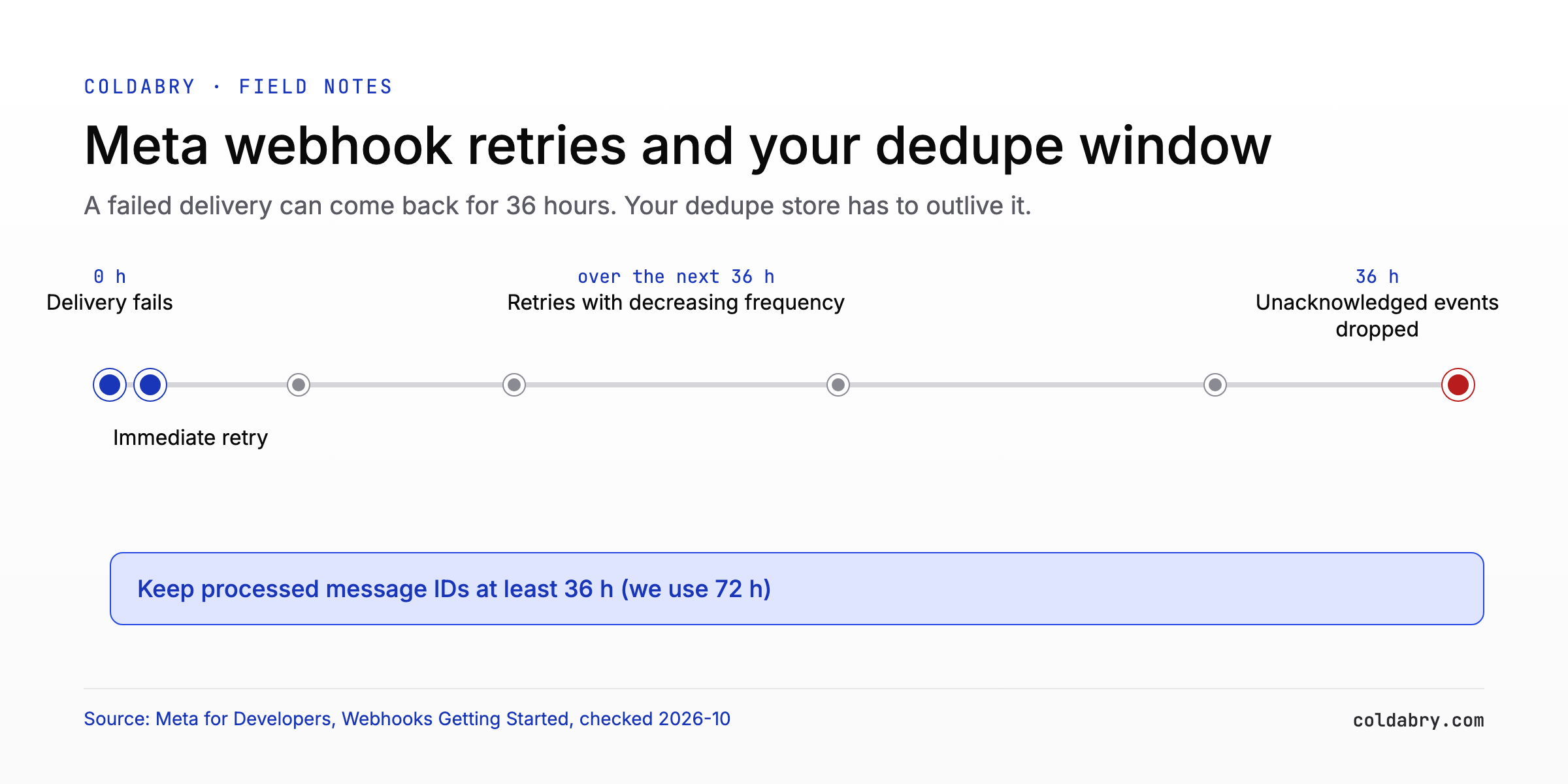
The handler in illustrative pseudocode (same shape in n8n, a serverless function or a worker):
handle(event):
  verify_signature(event)            # X-Hub-Signature-256
  ack_200()                          # before any CRM call
  enqueue(event, partition = event.sender_igsid)

worker(event):
  with lock(event.sender_igsid):
    if seen(event.message_id): return
    contact = crm.find_by("instagram_igsid", event.sender_igsid)
    contact = crm.upsert(contact, igsid, username, display_name)
    crm.add_note(contact, event.text, event.timestamp)
    if contact.owner is empty: assign_owner(contact)
    else: notify(contact.owner)
    mark_seen(event.message_id, ttl = 72h)
Worked example (illustrative). A new lead sends three messages in five seconds; delivery of the second fails and is retried two hours later. The lock makes messages 2 and 3 wait for message 1 to create the contact, so they update it. The retry finds message 2's ID in the processed store and is skipped. Result: one contact, three notes, one owner.
Instagram DM to HubSpot: upsert on a custom unique property
For Instagram DM to HubSpot, create a contact property such as instagram_igsid, mark it as a unique identifier, and use HubSpot's batch upsert endpoint with that property as the idProperty. HubSpot's Contacts API guide says the upsert endpoint accepts "email or a custom unique identifier property", updating contacts that exist and creating those that don't, via POST /crm/v3/objects/contacts/batch/upsert.
HubSpot calls email "the primary unique identifier to avoid duplicate contacts", but a DM lead rarely has one yet. HubSpot also notes that "partial upserts are not supported when using email as the idProperty" and recommends a custom unique identifier property instead (HubSpot). The IGSID property solves both problems.
An illustrative request body:
{
  "inputs": [
    {
      "idProperty": "instagram_igsid",
      "id": "IGSID_FROM_WEBHOOK",
      "properties": {
        "instagram_username": "example_handle",
        "firstname": "Example",
        "hs_lead_status": "NEW",
        "last_inbound_at": "2026-10-28T09:14:00Z"
      }
    }
  ]
}
Note: Log each DM as a note or activity on the contact, not as a property, so the history stays readable. Create a deal only when the conversation qualifies; a deal per DM fills the pipeline with noise. When the lead later types an email, write it to the IGSID record, then check for a separate email-keyed record and merge it (rule in the ownership section below).
By contrast, InstantDM's HubSpot guide fires a flow_completed webhook and its sample code creates a contact from the collected email, with no lookup first. Fine for one test lead; with retries it is where duplicates come from.
GoHighLevel Instagram duplicate contacts: why and the workaround
GoHighLevel creates duplicate Instagram contacts, according to a user request on its ideas board from April 2024, because Instagram IDs were not available in workflows. The post says: "When a contact already exists in our CRM and sends a DM via Instagram, the system fails to recognize the existing contact and creates a new, duplicate entry", and a commenter adds that "having to manually merge contacts kills the whole automation flow" (GHL Ideas, user report).
User report, not official docs: We found no official GoHighLevel documentation confirming Instagram-ID matching today, and we are not claiming it is fixed or still broken. Test it on your own sub-account: DM your page from an Instagram account that already exists as a contact and count the records afterwards.
If your test produces a duplicate, own the identity step yourself:
| Step | Native channel only | With your own sync layer |
|---|---|---|
| Identity key | Whatever the channel matches on | IGSID stored in a custom field |
| Lookup before create | Not under your control | Search custom field, then create |
| Same person, existing contact | Reported duplicate | Linked to the existing record |
| Clean-up | Manual merges | Scheduled merge review for leftovers |
For the review, list contacts sharing an email, phone or username and merge them weekly until the list stays empty.
Pipedrive Instagram integration: search, then create
For a Pipedrive Instagram integration, store the IGSID in a custom person field, search for it with an exact match before every write, and create the person only when nothing is found. We found no native Instagram DM channel in the API docs we checked.
Pipedrive's persons search "searches all persons by name, email, phone, notes and/or custom fields". Only some custom field types are searchable, including varchar and text, so create the IGSID field as text. Use exact_match, which returns "only full exact matches" and is not case sensitive. The search term needs at least 2 characters, or 1 with exact_match.
We found no upsert endpoint in those docs, so the per-IGSID lock matters most here: search-then-create is the pattern that races.
| HubSpot | GoHighLevel | Pipedrive | |
|---|---|---|---|
| Match key | Custom unique property (instagram_igsid) | IGSID in a custom field, via your layer | IGSID in a text custom field |
| Native upsert | Yes, batch upsert with idProperty | Not documented in our sources | Not in the docs we checked |
| Duplicate risk | Low once the unique property is used | Users report duplicates on the native channel | Race between search and create |
| Where the lock lives | Optional, upsert covers most races | Your sync layer | Your sync layer, required |
Who owns the conversation? Stop two reps replying to the same lead
Stop two reps replying to the same lead by writing an owner onto the CRM record the moment a human replies, and showing that owner in the inbox before anyone else can type. Connectors such as Bitrix24's promise a record "with owner, timeline, and next steps"; how the owner is decided is yours to define.
The rules we use:
- First human reply claims the thread. Write
ownerandclaimed_atback to the CRM in the same step as the reply. - Round-robin only for unowned threads. A new message on an owned thread notifies the owner; it never re-enters the rotation.
- Reassignment is manual. Only a manager changes the owner, and the change is logged.
- The inbox shows the owner first. No owner next to the thread means double replies.
- Merges keep the earliest owner. When a lead types an email, look it up; merge any separate email-keyed record into the IGSID record.
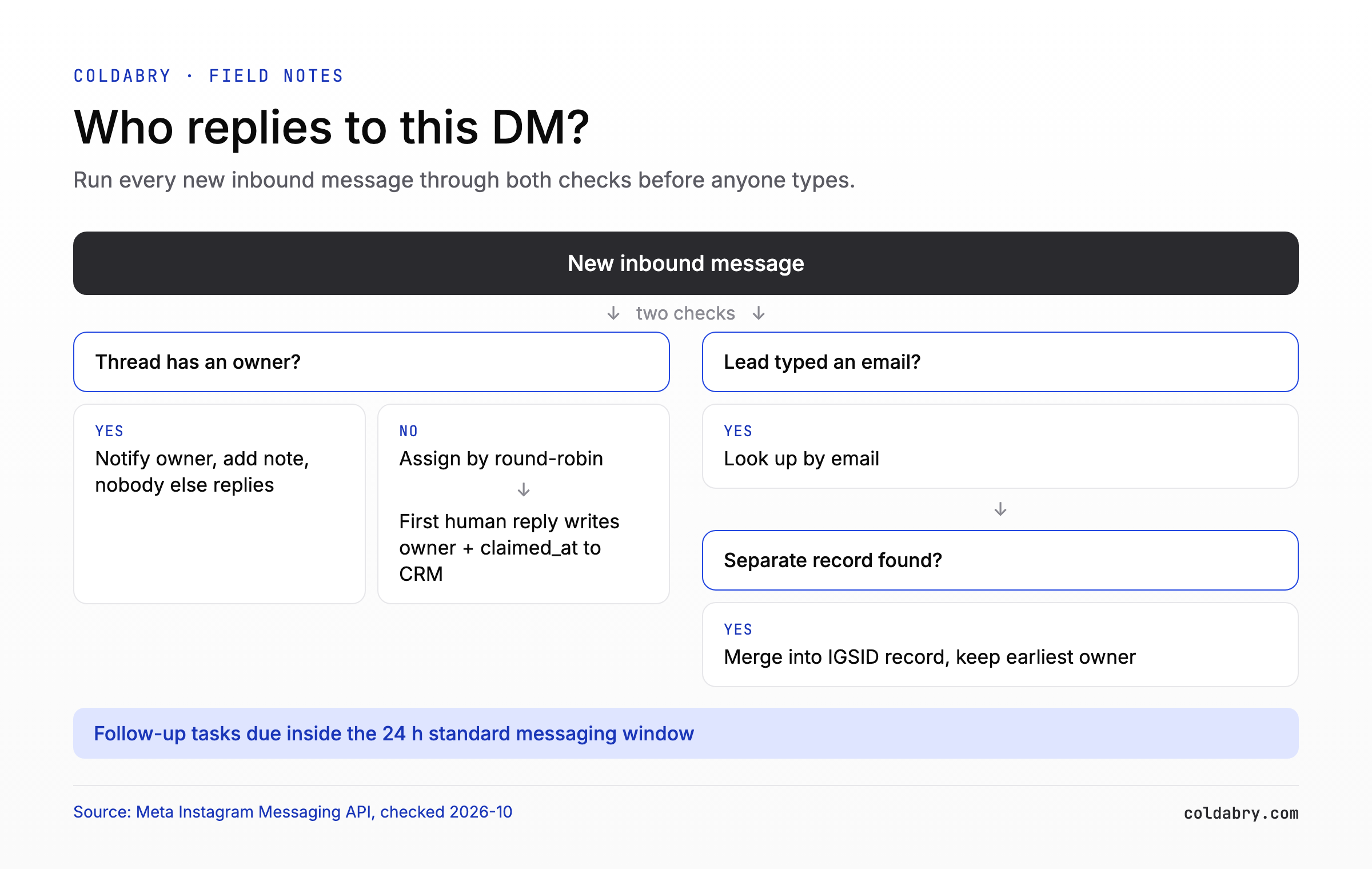
Tie follow-up tasks to last_inbound_at. Meta allows replies only after the user messages you, and the standard window "for most user actions, it lasts 24 hours" (Meta Messaging API), so a task due three days after a DM may be impossible to complete in Instagram.
When inbox and CRM are separate tools, a custom inbox app on top of your CRM puts owner, status and history in one view.
Build it yourself or use a connector?
Use a native connector when one person answers DMs and the lead's email is captured in the chat; build your own sync layer when several people answer, you push into more than one CRM, or you see duplicates you cannot control.
| Your situation | Native connector | Own sync layer |
|---|---|---|
| One person answers all DMs | Usually enough | Overkill |
| Two or more reps share the inbox | Check how it assigns owners | Recommended |
| Leads rarely give an email in chat | Check what it matches on | Recommended (IGSID key) |
| GoHighLevel and duplicates appear in your test | Manual merges | Recommended |
| Pipedrive (no native DM channel found) | Third-party tool needed anyway | Recommended |
| More than one CRM or a CRM migration planned | One connector per CRM | Recommended |
If Meta's own tools are part of the decision, compare Meta Business Agent vs AI DM setters first. For cost, see picking automation with real ROI. A sync layer like this is a typical piece of custom AI automation for lead routing, and our pricing page shows how such builds are scoped.
Instagram DM to CRM checklist: 10 checks against duplicates
Run these before trusting the sync with real leads.
| # | Check | Pass when |
|---|---|---|
| 1 | Signature verified | A request with a wrong X-Hub-Signature-256 is rejected |
| 2 | Fast 200 | The endpoint answers before any CRM call |
| 3 | Events handled one by one | A batch and a single event produce the same result |
| 4 | Message ID dedupe | Replaying the same event twice creates one note |
| 5 | Processed IDs kept long enough | TTL is longer than 36 hours |
| 6 | IGSID unique field | The CRM rejects or merges a second record with the same IGSID |
| 7 | Per-IGSID lock | Three fast messages from a new account create one contact |
| 8 | Owner written on first reply | Owner and claimed_at appear in the CRM after the first human reply |
| 9 | Email merge | A known email typed in chat leaves one record, earliest owner |
| 10 | Weekly duplicate report | No records share email, phone or username |
FAQ
Can Instagram DMs sync to HubSpot automatically?
Yes. Meta sends a webhook for each inbound DM on an Instagram professional account, and a sync layer or connector can write it to HubSpot. To avoid duplicates, create a custom contact property for the Instagram-scoped ID, mark it as a unique identifier, and use HubSpot's batch upsert endpoint with that property as the idProperty. Upsert updates existing contacts and creates missing ones. Log each DM as a note, and merge any separate email-based record into the Instagram one once the lead shares an email.
Does Pipedrive have a native Instagram DM integration?
In the Pipedrive API documentation we checked, we found no native Instagram DM channel, so setups use a third-party tool or a custom webhook layer. Store the Instagram-scoped ID in a text custom field on the person, then run the persons search with exact match before every write. Create the person only when the search returns nothing, and run that step under a lock per Instagram user, so two fast messages cannot both create a record.
Why does GoHighLevel create duplicate contacts from Instagram DMs?
A user request on GoHighLevel's ideas board from April 2024 says Instagram IDs were not captured in workflows, so an existing contact who sent a DM was not recognized and a duplicate was created. Users also report that Instagram display names rarely match real names. This is a user report, not official documentation, so test your own sub-account. If duplicates appear, store the Instagram-scoped ID in a custom field through your own layer, match before creating, and review merges weekly.
What is an Instagram-scoped ID (IGSID) and can it change?
The Instagram-scoped ID is the identifier Meta includes in every message webhook for the person who sent the DM. It is scoped to your account and app setup, and it arrives even when the lead has given no email or phone, which makes it the best CRM match key. Treat it as stable for one account and one API setup. Meta says identifiers are not interchangeable between its two Instagram API setups, so plan a migration if you switch.
How long does Meta retry a failed Instagram webhook?
Meta's webhook documentation says a failed delivery is retried immediately, then a few more times with decreasing frequency over the next 36 hours, after which unacknowledged notifications are dropped. Meta tells developers to handle deduplication themselves. Store every processed message ID with a time-to-live longer than 36 hours, for example 72, and skip any event you have seen. Answer each notification with 200 OK quickly and do the CRM work from a queue.
How do I stop two team members replying to the same Instagram DM?
Give every thread one owner and show that owner before anyone replies. The first human reply claims the thread by writing an owner and a claimed-at time to the CRM record. Later messages notify that owner instead of going back into round-robin, and only a manager can reassign. Your inbox must show the CRM owner next to the conversation. Dedupe contacts by Instagram-scoped ID first, because two records for one person means two owners.
We build this kind of identity, dedupe and ownership layer as custom automation for teams that answer Instagram DMs together.