Instagram Messaging API in 2026: What It Can and Can't Do
What the Instagram Messaging API really allows in 2026: the 24-hour window, the 7-day human agent tag, rate limits, PDF attachments, webhooks, and why it can never start a cold conversation.

A typical case: an agency connects a client's Instagram account to GoHighLevel or ManyChat, imports a list of 500 leads and builds a workflow to DM all of them. The workflow saves, the leads sit in the list, and nothing goes out. The Instagram action only fires for people who already wrote to the account.
That is not a bug in the tool. The Instagram Messaging API, the official interface those tools sit on, is a reply API for Instagram Professional accounts. Meta's documentation is explicit: "You can only message a user after they have messaged your app user's account first."
Once a person writes, your app has 24 hours to respond with anything, and a human agent can reply for up to seven days using the human_agent tag. What it cannot do is open a conversation. Below is the full developer picture: access, the window, every documented limit in one table, attachments, webhooks, the 2025-2026 changelog and a build checklist.
What is the Instagram Messaging API (and who can use it)?
The API works only for Instagram Professional accounts, meaning business and creator accounts. Personal accounts are out.
There are two flavors. The newer one is the Instagram API with Instagram Login, which uses the base URL graph.instagram.com (Meta's samples use v25.0) and does not need a Facebook Page. The older one runs through Facebook Login for accounts linked to a Page; the changelog still ships features to both.
Your app needs two permissions, instagram_business_basic and instagram_business_manage_messages, and an Instagram User access token from a person who can send messages from the professional account. The access level decides whose accounts you can serve.
| Access level | What it unlocks | Review needed |
|---|---|---|
| Standard Access | Accounts you own, manage, or added to the app in the App Dashboard. Some features may not work until Advanced Access. | No App Review for your own accounts |
| Advanced Access | Professional accounts you do not own or manage (any multi-tenant SaaS or agency tool) | App Review |
| Human Agent feature | Human replies tagged human_agent up to 7 days after the user's message | App Review plus business verification |
Sources: Meta Messaging API, Meta Human Agent reference, checked October 2026.
How does the Instagram 24-hour messaging window work?
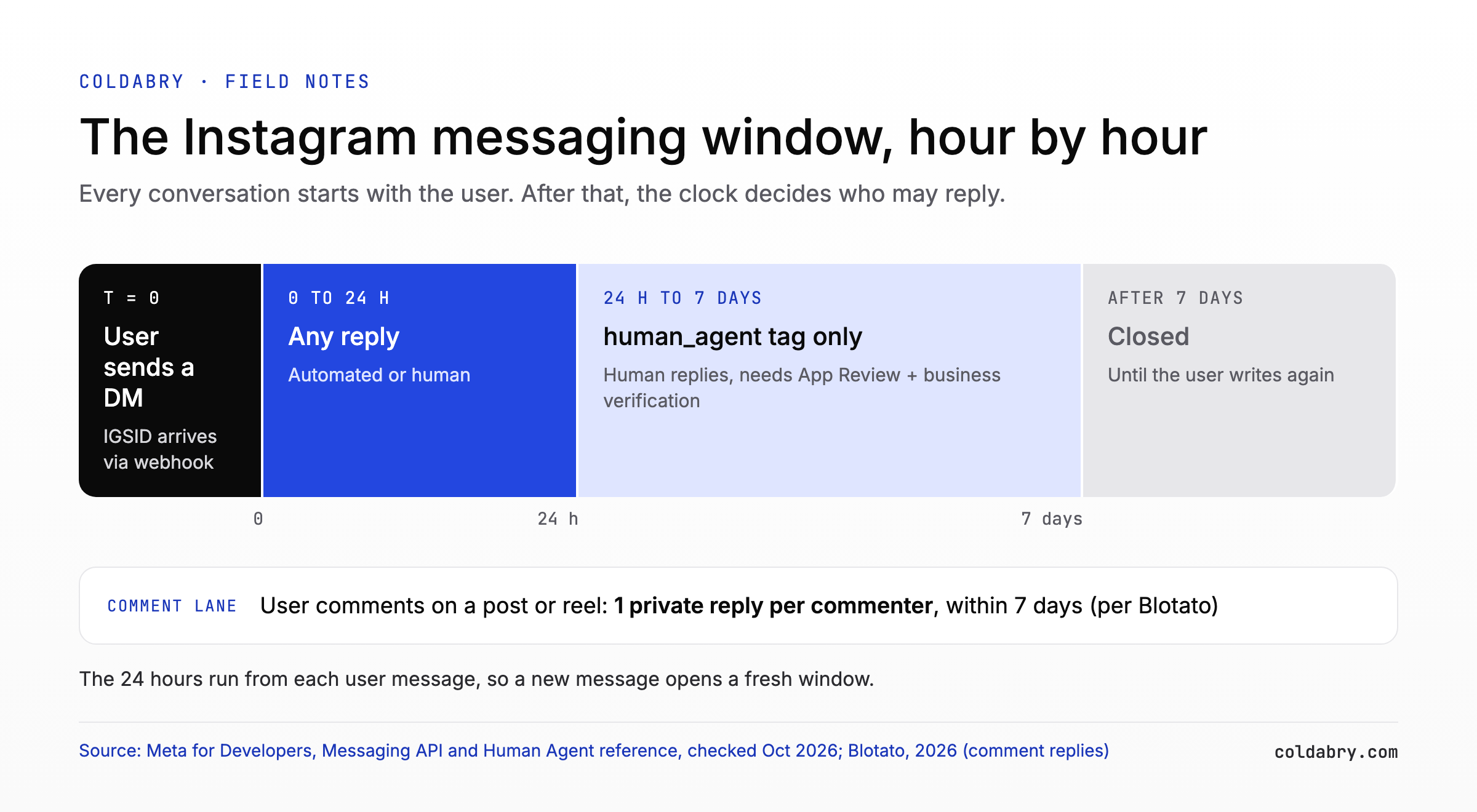
A conversation begins when the Instagram user sends a message. The webhook delivers that person's Instagram-scoped ID (IGSID), and from that moment your app has 24 hours to respond. Inside that window you can send automated replies, media, quick replies and templates. The 24 hours run from each message the user sends, so a new message gives you a fresh window.
After 24 hours, only one route stays open: the human_agent tag. Meta's feature reference says it lets a human agent reply to user messages within seven days of receipt. Meta's examples: a business closed over the weekend, or an issue that takes more than 24 hours. Meta describes it as a tag for human agents, so keep it out of bot logic; it also requires App Review and business verification.
Comments are a side door. Blotato's 2026 guide reports a 7-day window to send a single private reply to a comment, one private reply per commenter. Meta's rate limit page confirms private replies to comments exist as their own call type, with their own cap (see the reference table below). Meta's pages we checked give no window for private replies.
Can you send cold DMs with the Instagram API?
No. The rule is in the first lines of the Messaging API docs: you can only message a user after they have messaged the account first. No permission or access tier lifts this. The only business-sent first DM is a private reply to someone who commented, and that still needs their comment first.
That is why GoHighLevel and ManyChat users find out their Instagram automation is inbound only. Those tools are built on the official API, so they inherit its rule. A GoHighLevel tutorial notes that the workflow DM action needs the contact to have messaged your connected Instagram account within the past 24 hours. If you are comparing those platforms on cost, see ManyChat pricing and alternatives.
Architecturally, the API gives you a reactive system: your code waits for a webhook, then answers. Every growth play has to make the user send the first message. The legitimate entry points are comments that trigger a private reply, story replies (they arrive as messages), ads and referral links that open a DM (reported through the messaging_referrals webhook), and a call to action in the bio.
Note: Tools that send cold DMs do it outside the official API, by driving a logged-in account. That breaks Instagram's terms and puts the account at risk. We cover the trade-offs in Instagram cold DM tools and their ban risk and what to do if Instagram suspends the account.
| You want to | Official route |
|---|---|
| DM a list of leads who never wrote to you | Not possible through the API |
| DM people who comment on a post | Private reply to the comment (750 calls per hour per account) |
| Start chats from ads | Ad or referral link that opens a DM; track with messaging_referrals |
| Follow up after a day of silence | Only a human, with human_agent, within 7 days |
| Message a group chat | Not supported; one customer per conversation |
Sources: Meta Messaging API, Meta rate limiting.
Instagram Messaging API endpoints and limits: reference table
Messages go out through one endpoint: POST /<IG_ID>/messages or POST /me/messages on graph.instagram.com, with two required parameters, recipient (the IGSID) and message (Meta). The limits are spread across Meta's rate limiting page and the Messaging API page. Here they are in one place.
| Item | Limit | Source |
|---|---|---|
| Send API: text, links, reactions, stickers | 300 calls per second per Professional account | Meta rate limiting |
| Send API: audio or video | 10 calls per second per account | Meta rate limiting |
| Conversations API (reading threads) | 2 calls per second per account | Meta rate limiting |
| Private replies to post and reel comments | 750 calls per hour per account | Meta rate limiting |
| Private replies to Live comments | 100 calls per second per account | Meta rate limiting |
| Single thread | May be rate limited if too many messages go to one thread (no number given) | Meta rate limiting |
| Inbox volume | Above 72,000 messages sent and received (no time window stated), new messages stop showing in the Inbox and the account cannot send until volume drops | Meta rate limiting |
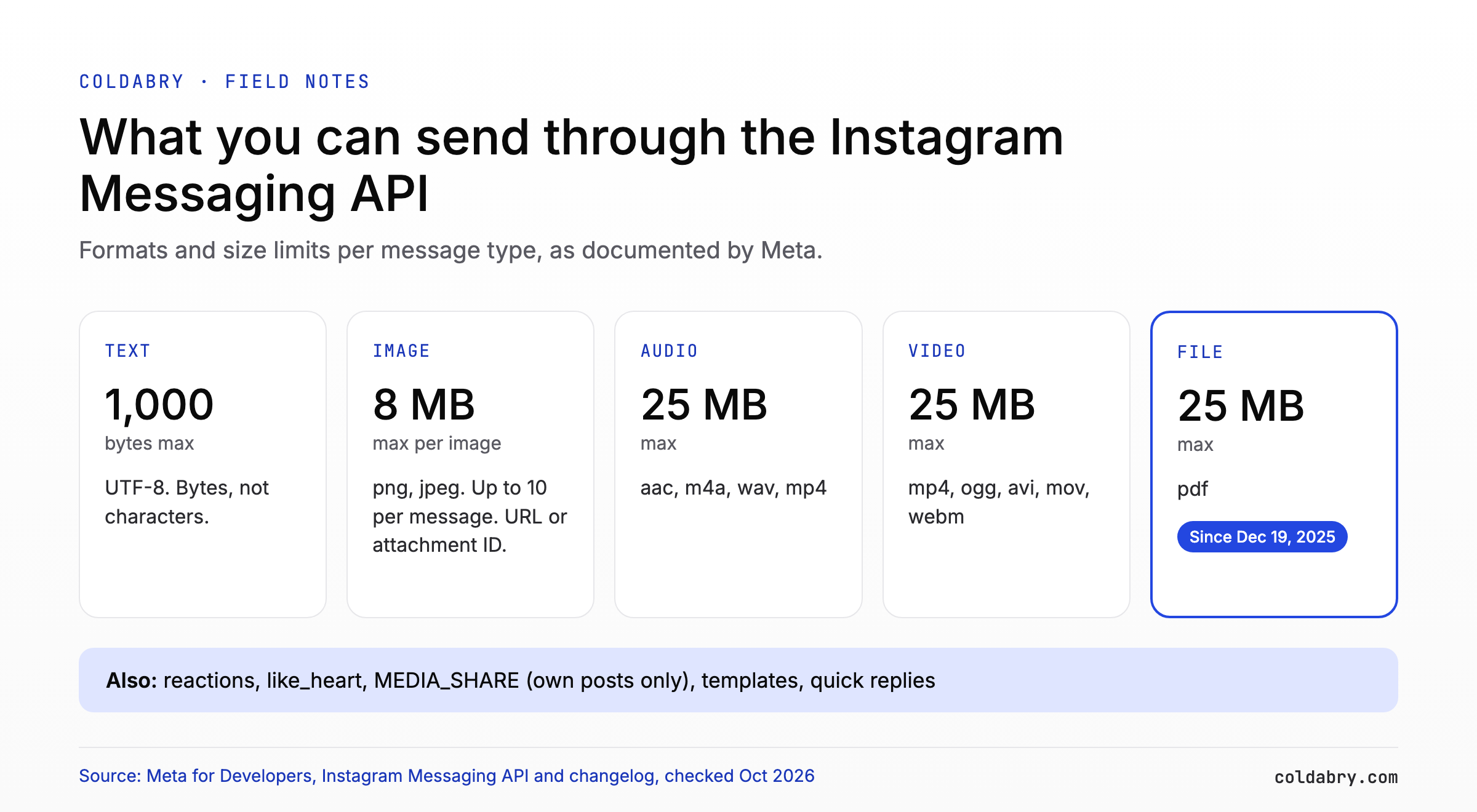
| Text message | UTF-8, 1,000 bytes or less | Meta Messaging API |
| Images | png or jpeg, 8 MB, up to 10 per message | Meta Messaging API |
| Audio | aac, m4a, wav, mp4, 25 MB | Meta Messaging API |
| Video | mp4, ogg, avi, mov, webm, 25 MB | Meta Messaging API |
| File | pdf, 25 MB | Meta Messaging API |
| Reply window | 24 hours; 7 days for human replies with human_agent | Meta Human Agent |
Worked example (assumptions: one account, private replies to post comments only, no pauses). 750 private replies per hour x 24 hours = 18,000 private replies per day as a ceiling. If each of those people answers once and you reply once more, that is 18,000 x 3 = 54,000 messages sent and received. Meta does not say over what period the 72,000 is counted; if it were a single day, that would already be three quarters of the cap. A viral comment campaign can approach the inbox cap long before the per-second send limits.
About the "200 calls per hour" figure that circulates in tool reviews: we found no Meta source for it on Instagram. It looks like a mix-up with the Messenger formula for Facebook Pages, "Calls within 24 hours = 200 * Number of Engaged Users", which is per day and scales with engaged users. Instagram's documented limits are the per-second and per-hour numbers above.
What can you send: attachments, PDFs and quick replies?
Beyond text, the Messaging API accepts images, audio, video and files, plus reactions (react and unreact), the heart sticker (like_heart), shared posts (MEDIA_SHARE), templates and quick replies. Shared posts must be owned by the app user; you cannot forward someone else's content.
PDFs are the newest file type. Since December 19, 2025, PDF attachments can be sent in Instagram Direct through both the Facebook Graph API (Page-linked accounts) and the Instagram API (Instagram-only accounts).
For images, two changes matter. Since March 13, 2026 the send API accepts attachment IDs as well as URLs: upload once through the Attachment Upload API and reuse the ID for many recipients, which avoids timeouts on large files. Since May 6, 2026 sending multiple images, up to ten per message, is out of beta for all accounts.
For buttons, Blotato reports a 640-character text limit when buttons are attached, a maximum of 3 link buttons or 13 quick replies (never both), and that buttons render on mobile only. Treat those as third-party figures and test them on a real device.
Which webhooks does Instagram messaging send?
Your app learns about every conversation through webhooks. Meta lists six messaging fields on the Messaging API page, and the changelog added message_edit on September 10, 2025.
| Webhook field | Event | Typical use |
|---|---|---|
messages | User sends a message (includes the IGSID) | Start or reset the 24-hour timer, route to bot or human |
messaging_postbacks | User taps a button | Advance a flow step |
messaging_optins | User opts in | Record consent |
messaging_reactions | User reacts to a message | Light engagement signal |
messaging_referrals | User arrives from an ad or referral link | Attribute the conversation to a campaign |
messaging_seen | User has seen your message | Separate "sent" from "read" |
message_edit | User edits a message (since Sep 2025) | Update the stored text |
Source: Meta Messaging API, Meta changelog.
A few behaviors catch builders out. Messages from non-followers land in the Requests folder, followers go to Primary, and a thread moves to General only after the app user replies through the app. Messages read through the API or a webhook are not marked Read until you send a reply, and Requests-folder messages inactive for 30 days are not returned by API calls (Meta). Webhooks for shared content include only the URL.
A successful send call means Meta accepted the message, not that the person saw it. If your reporting needs "read", listen to messaging_seen. Story replies now carry link_sticker_url inside reply_to.story since December 12, 2025.
What changed in the Instagram Messaging API in 2025-2026?
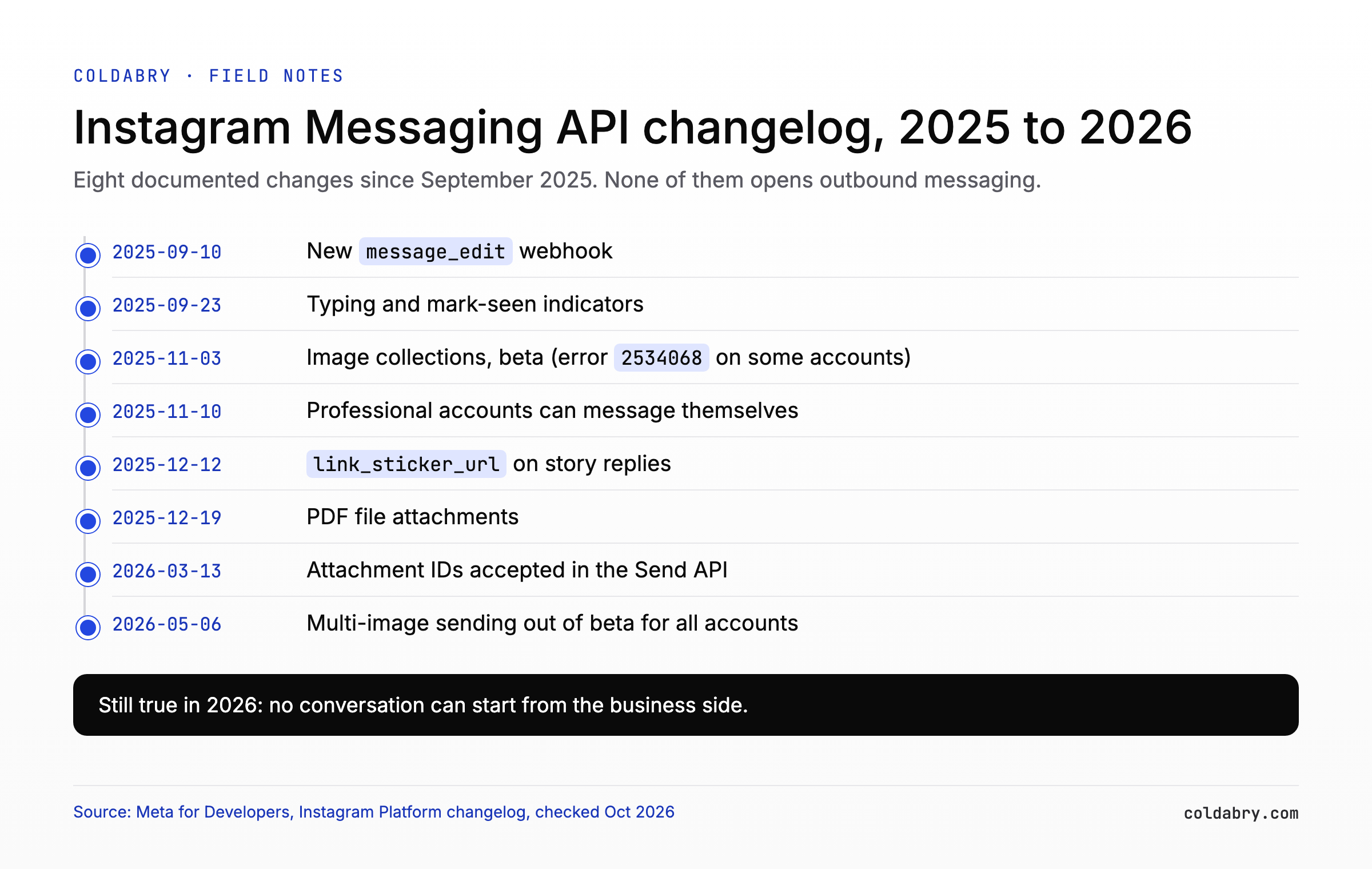
Meta's Instagram Platform changelog lists eight messaging changes from September 2025 to May 2026. None of them lifts the inbound-only rule.
| Date | Change |
|---|---|
| 2025-09-10 | New message_edit webhook subscription |
| 2025-09-23 | Sender actions: typing and mark-seen indicators |
| 2025-11-03 | Image collections in Direct, beta; some accounts get error 2534068 |
| 2025-11-10 | Professional accounts can message themselves |
| 2025-12-12 | link_sticker_url added to reply_to.story |
| 2025-12-19 | PDF file attachments |
| 2026-03-13 | Send API accepts attachment IDs as well as image URLs |
| 2026-05-06 | Sending multiple images out of beta for all accounts |
Two shifts sit around the API rather than in it. Meta's encryption roadmap affects what third parties can see in DMs; we wrote about Instagram's end-to-end encryption change for DMs. And the human agent tag remains the only documented way past 24 hours.
Build checklist before you ship
If you are building on the API rather than renting a tool, this is the list we would run before launch. It is also a quick test of when a custom app beats off-the-shelf: if your needs fit inside the table above, a tool may be enough.
| # | Step | Why | Source |
|---|---|---|---|
| 1 | Confirm every connected account is Professional (business or creator) | Personal accounts are not supported | Meta overview |
| 2 | Request instagram_business_basic and instagram_business_manage_messages | Required permissions | Meta Messaging API |
| 3 | Plan for Advanced Access (App Review) if you serve accounts you do not own; add business verification if you need human_agent | Standard Access covers only your own accounts | Meta Messaging API, Meta Human Agent |
| 4 | Set up and verify the webhook, subscribe to the fields you need, including message_edit | The API is event driven; no webhook, no conversations | Meta changelog |
| 5 | Store the IGSID per contact and keep a 24-hour timer per thread, counted from the latest user message | Sends outside the window fail | Meta Messaging API |
| 6 | Expose human_agent only from the human inbox UI, never from bot logic | Meant for human support within 7 days; needs App Review | Meta Human Agent |
| 7 | Queue sends and back off on throttling, with separate budgets for media (10/s) and comment replies (750/h) | Per-account limits and single-thread throttling | Meta rate limiting |
| 8 | Track total messages sent and received against 72,000 (Meta states no time window) | Above it the account cannot send | Meta rate limiting |
| 9 | Validate text at 1,000 bytes (not characters) and file sizes before upload; reuse attachment IDs | Avoids rejected sends and timeouts | Meta Messaging API |
| 10 | Disclose automated chat where the law requires it | Meta flags California and Germany | Meta Messaging API |
| 11 | Handle error 2534068 if you send image collections | Feature not yet available on some accounts | Meta changelog |
| 12 | Design entry points (comments, story replies, ads, bio) so users write first | The API cannot start conversations | Meta Messaging API |
FAQ
Is the Instagram Messaging API free?
Meta's developer pages we cite list no per-message price for the Instagram Messaging API. The real costs sit elsewhere: building and hosting the webhook receiver and send queue, the time App Review and business verification take if you need Advanced Access or the Human Agent feature, and maintenance as Meta ships changes like the ones in its changelog. If you use a tool like ManyChat or GoHighLevel instead, you pay the tool's subscription, and the tool still runs on the same API and the same rules.
Can I use the Instagram Messaging API with a personal account?
No. The API supports Instagram Professional accounts only, which means business or creator accounts. With the Instagram API with Instagram Login, you no longer need a linked Facebook Page, although some third-party tools still ask for a Page connection; check your tool's setup docs. A person who can send messages from the account must then authorize your app.
Do I need App Review for the Instagram Messaging API?
It depends on whose accounts you serve. Standard Access works for accounts you own, manage, or added to your app in the App Dashboard, so an in-house integration for your own brand can run without App Review, though Meta notes some features may not work until Advanced Access is granted. Any app that serves Professional accounts you do not own, such as an agency tool or SaaS product, needs Advanced Access through App Review. The Human Agent feature, which allows human replies up to seven days later, needs both App Review and business verification.
How long do I have to reply to an Instagram DM via API?
Your app has 24 hours from the user's message to reply with anything, automated or human. The 24 hours run from each message the user sends, so a new message gives you a fresh window. After it closes, a human agent can still reply for up to seven days from the user's message by tagging it human_agent. That tag needs App Review and business verification, and Meta describes it as a tag for human agents. After seven days, you have to wait for the user to write again.
Why can't ManyChat or GoHighLevel send the first Instagram DM?
Both are built on Meta's official Instagram Messaging API, and the API only allows a business to message a user after that user has messaged the account first. No permission, plan or access tier changes this, so no tool on the official API can send a true cold DM. They can only react fast once a person writes. Tools that do send cold DMs work outside the API by controlling a logged-in account, which breaks Instagram's terms.
What are the Instagram Messaging API rate limits?
Per Instagram Professional account, Meta documents 300 calls per second for text, links, reactions and stickers, 10 calls per second for audio or video, and 2 calls per second for the Conversations API. Private replies to post and reel comments are capped at 750 per hour, and private replies to Live comments at 100 per second. Sending many messages into one thread can be throttled. If an account sends and receives more than 72,000 messages, new messages stop showing in the Inbox and it cannot send until volume drops.
The Instagram Messaging API is a solid foundation for answering people fast and at volume, as long as the product is designed around users writing first. Coldabry builds custom AI apps and automations that clients own.