ManyChat Pricing 2026: What's Free and the Best Alternatives
ManyChat moved to five plans priced by monthly active contacts. What each plan costs at your volume, what the free plan and Meta's own free tools cover, and six alternatives compared.

A typical case: a coach posts a reel that says "comment GUIDE and I'll DM you the link." Six hundred people comment in two days. She set up a free ManyChat account last year, and now she is not sure which free plan it is on or what this month will cost.
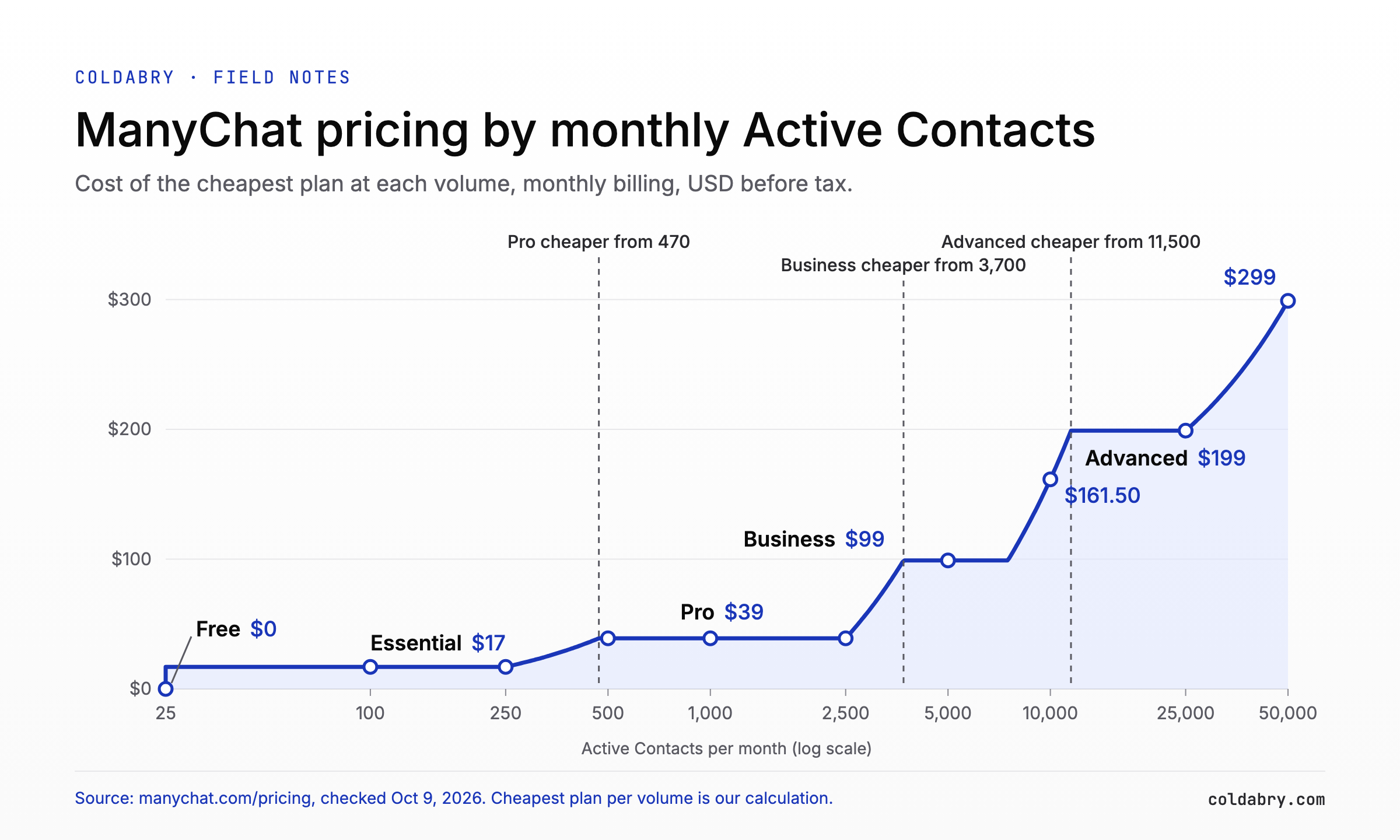
ManyChat pricing in 2026 has five plans billed by Active Contacts, the people you interact with in a month: Free ($0, 25 people), Essential ($17 a month, 250), Pro ($39, 2,500), Business ($99, 7,500) and Advanced ($199, 25,000), per the ManyChat pricing page. Annual billing lowers them to $14, $29, $69 and $139 a month. Extra people cost from $0.10 down to about $0.004 each, and AI and WhatsApp start on Pro.
ManyChat still has a free plan, but it now covers only 25 Active Contacts a month, up to 4 live automations and 2 channels, with ManyChat branding. Meta Business Suite handles comment-to-DM replies, keyword replies and FAQs at no extra cost (free app). Every paid ManyChat alternative, from Inrō at €12.99 and CreatorFlow at $15 to respond.io from $79, follows the same Meta rules, so none can message someone who has not engaged first (Meta for Developers). For the coach's 600 people, Pro at $39 is cheaper than Essential at $52.
How much does ManyChat cost in 2026? ManyChat pricing by plan
From manychat.com/pricing, checked October 9, 2026. Prices are before tax and in USD; ManyChat says "The price is determined by the user's billing country."
| Plan | Monthly | Annual (per month) | Active Contacts included | Each extra contact (monthly / annual) | Channels | Users |
|---|---|---|---|---|---|---|
| Free | $0 | $0 | 25 | Not available | Any 2 | 1 |
| Essential | $17 | $14 ($168/yr, 18% off) | 250 | $0.10 / $0.082 | Any 2 | 2 |
| Pro | $39 | $29 ($348/yr, 25% off) | 2,500 | $0.05 / $0.038 | Any 3 | 3 |
| Business | $99 | $69 ($828/yr, 30% off) | 7,500 | $0.025 / $0.018 | Unlimited | 5 |
| Advanced | $199 | $139 ($1,668/yr, 30% off) | 25,000 | about $0.004 / $0.0028 | Unlimited | 10 |
ManyChat defines the unit simply: "One person = one Active Contact for the month," however many messages you exchange (pricing FAQ). Imported contacts do not count until they become active, and the count resets monthly even on annual plans (ManyChat Help Center). Deleting contacts does not lower that month's usage (ManyChat blog).
ManyChat's own example: Essential with 280 Active Contacts means 30 extra, so 30 x $0.10 = $3 and a $20 bill (ManyChat blog). Extra Inbox seats cost $25 each on Pro and above (pricing page), and sales tax is added (ManyChat blog).
Which ManyChat plan is cheapest at your volume?
A lower plan plus overage can cost more than the next plan up. Formula: base price + (contacts above the included amount x overage rate). Our calculation from the pricing page, October 2026:
| Active Contacts per month | Monthly billing | Annual billing (per month) |
|---|---|---|
| 25 | Free, $0 | Free, $0 |
| 100 to 250 | Essential, $17 | Essential, $14 |
| 500 | Pro, $39 (Essential: $42) | Pro, $29 (Essential: $34.50) |
| 2,000 to 2,500 | Pro, $39 | Pro, $29 |
| 5,000 | Business, $99 (Pro: $164) | Business, $69 (Pro: $124) |
| 10,000 | Business, $161.50 | Business, $114 |
| 25,000 | Advanced, $199 (Business: $536.50) | Advanced, $139 |
| 50,000 | Advanced, $299 | Advanced, $209 |
On monthly billing the switch points are 470, 3,700 and 11,500 people. Essential reaches Pro's price when 17 + (N - 250) x 0.10 = 39, so N = 470. On annual billing they fall to about 433, 3,553 and 11,389.
Features override the arithmetic: email and phone capture, conditions and A/B tests start on Essential; AI replies and WhatsApp on Pro (ManyChat pricing). An account with 100 people a month that needs AI pays $39, not $17.
The real risk is one viral post. Example: 3,000 people comment on a reel while you are on Essential, which comes to 17 + 2,750 x $0.10 = $292. On Pro the same month costs 39 + 500 x $0.05 = $64. ManyChat says that upgrading within the same billing cycle means "any overage fees incurred so far will be forgiven," and you can set an overage threshold (pricing FAQ).
Do this before a launch: set the overage threshold in Settings > Billing > Subscription. Billing is per account, not per user, so an agency with ten client accounts pays for ten plans (ManyChat Help Center).
Is ManyChat free? What the free plan includes (and what changed in 2026)
Yes. The ManyChat free plan is $0, and "The Free plan doesn't require a credit card" (ManyChat pricing). It covers 25 Active Contacts a month, up to 4 live automations (Comment to DM counts toward the 4), any 2 channels from Instagram, Messenger, TikTok and Telegram, 1 user and ManyChat branding. Free has no overage pricing, so the only way past 25 people is an upgrade.
| Feature | Free ($0) | Essential ($17) | Pro ($39) |
|---|---|---|---|
| Active Contacts per month | 25 | 250 | 2,500 |
| Automations | Up to 4 live | Unlimited custom | Advanced, plus broadcasts |
| Channels | Any 2 | Any 2 | Any 3 |
| WhatsApp, SMS, email | No | No | Yes (up to 10k emails) |
| Collect email or phone in DMs | No | Yes | Yes |
| Conditions and follower check | No | Yes | Yes |
| A/B randomizer | No | Yes | Yes |
| AI replies and AI comments | No | No | Yes |
| ManyChat branding | Yes | Removed | Removed |
| Users | 1 | 2 | 3 |
Source: manychat.com/pricing, comparison table, checked October 9, 2026.
What changed: before March 2, 2026, the free plan let you "engage up to 1,000 contacts FREE OF CHARGE," and Pro started at $15 a month, scaling with list size (archived ManyChat pricing, October 2025). The old cap counted stored contacts; the new one counts people per month. New plans apply by default to accounts created on or after March 2, 2026, and older accounts are moving over "country by country" (ManyChat Help Center).
Not sure which plan you are on? Open Settings > Billing > Subscription (ManyChat blog). Essential and Pro have a 14-day free trial, refunds are possible within 30 days of purchase, and annual plans "cannot be downgraded until the current annual term ends" (pricing FAQ).
Does Instagram have free comment-to-DM without ManyChat? (Meta Business Suite)
Yes, inside Meta Business Suite. Its Inbox automations work for Facebook Pages, Instagram business accounts and WhatsApp Business accounts connected to Business Suite (Meta Business Help Center). Templates include instant reply, away message, FAQs, hours, custom keywords and Comment to message, which will "Send a message reply to comments on your posts that contain specific keywords or phrases" (Meta setup guide). It is built in, with no separate fee.
The documented limits (Meta):
- Up to 5 keywords or phrases per rule, case-sensitive, exact match only, and each keyword in one rule only.
- Keyword replies go out after 15 minutes unless you reply first.
- When a template and a keyword automation both trigger, the template wins.
- Keyword and comment rules are set up only on desktop (Meta).
- Turning on Meta Business Agent pauses existing automations.
Viewed from Europe, Meta's setup page shows a banner that some "organic messaging features for businesses and ads delivered to and from Europe and Japan will be unavailable" (Meta, checked October 9, 2026).
| Meta Business Suite | ManyChat Free | |
|---|---|---|
| Price | Included with Meta Business Suite, no separate fee | $0, 25 Active Contacts/month |
| Comment-to-DM | Yes, keyword match | Yes, within 4 live automations |
| Keyword rules | Up to 5 per rule, exact match | Yes |
| Multi-step flows with branching | Custom rules with conditions and actions; no branching conversation flows | No (Essential and up) |
| Collect email or phone | Not in the template list | No (Essential and up) |
| AI | Meta Business Agent | No (Pro and up) |
Verdict: one keyword, one link, one reply per comment comes with Business Suite at no extra fee. You pay for sequences, data capture and AI. If comment-to-DM is the first step of a sales conversation, see this guide to comment-to-DM as a warm entry.
The best ManyChat alternatives in 2026, compared
Same inbound job, compared from public pricing pages on October 9, 2026. We did not test them hands-on, so there are no ratings. Many alternatives lists mix in helpdesk and website live-chat tools (Tidio, Zendesk, Intercom); those answer chats on your site, not Instagram comments, so they are left out here.
| Tool | Free plan | Paid from (monthly) | Billed by | Channels (as stated) | Fits |
|---|---|---|---|---|---|
| Meta Business Suite | Built in | No separate fee (free app) | Nothing | Messenger, Instagram, WhatsApp | One keyword-to-link reply |
| ManyChat | 25 contacts/month | $17 | Active Contacts | Instagram, Messenger, TikTok, Telegram; WhatsApp from Pro | Flows, data capture, AI in one tool |
| LinkDM | 1 account, 1,000 DMs/month | $19 (3 accounts, 25,000 DMs) | DMs sent | Instagram, Facebook | High DM volume on a budget |
| CreatorFlow | 500 DMs/month | $15 (5,000 DMs) | DMs per workspace | Instagram-only lead magnets | |
| Inrō | 100 contacts/month, 3 campaigns | €12.99 (up to 500 contacts) | Active contacts | Small lists billed by people | |
| Chatfuel | Trial only, no card | $20 (incl. $20 AI credits) | Flat, plus AI credits | WhatsApp, Instagram, Facebook | WhatsApp plus Instagram, light AI |
| respond.io | 7-day trial | from $79 | Contacts you talk to | Team inbox; WhatsApp fees extra | A team sharing one inbox |
The fine print that changes the choice:
- LinkDM meters DMs, not people; branding removal and reminder DMs start on Pro, and Platinum+ is $99 for 10 accounts and 300,000 DMs (LinkDM).
- CreatorFlow is $12 billed annually; email collection is not on Free, and "A payment method is required to start" the trial (CreatorFlow).
- Inrō scales by active contacts, for example €39.99 at 1,501 to 2,000, and its FAQ says "All plans run on Meta's official API" (Inrō, prices in euros).
- Chatfuel includes unlimited active contacts with fair-use AI limits; past the limit, the bot pauses until the limit resets (Chatfuel limits).
- respond.io has no free plan, and WhatsApp fees are charged by Meta on top (respond.io).
Can any ManyChat alternative message people who never interacted with you?
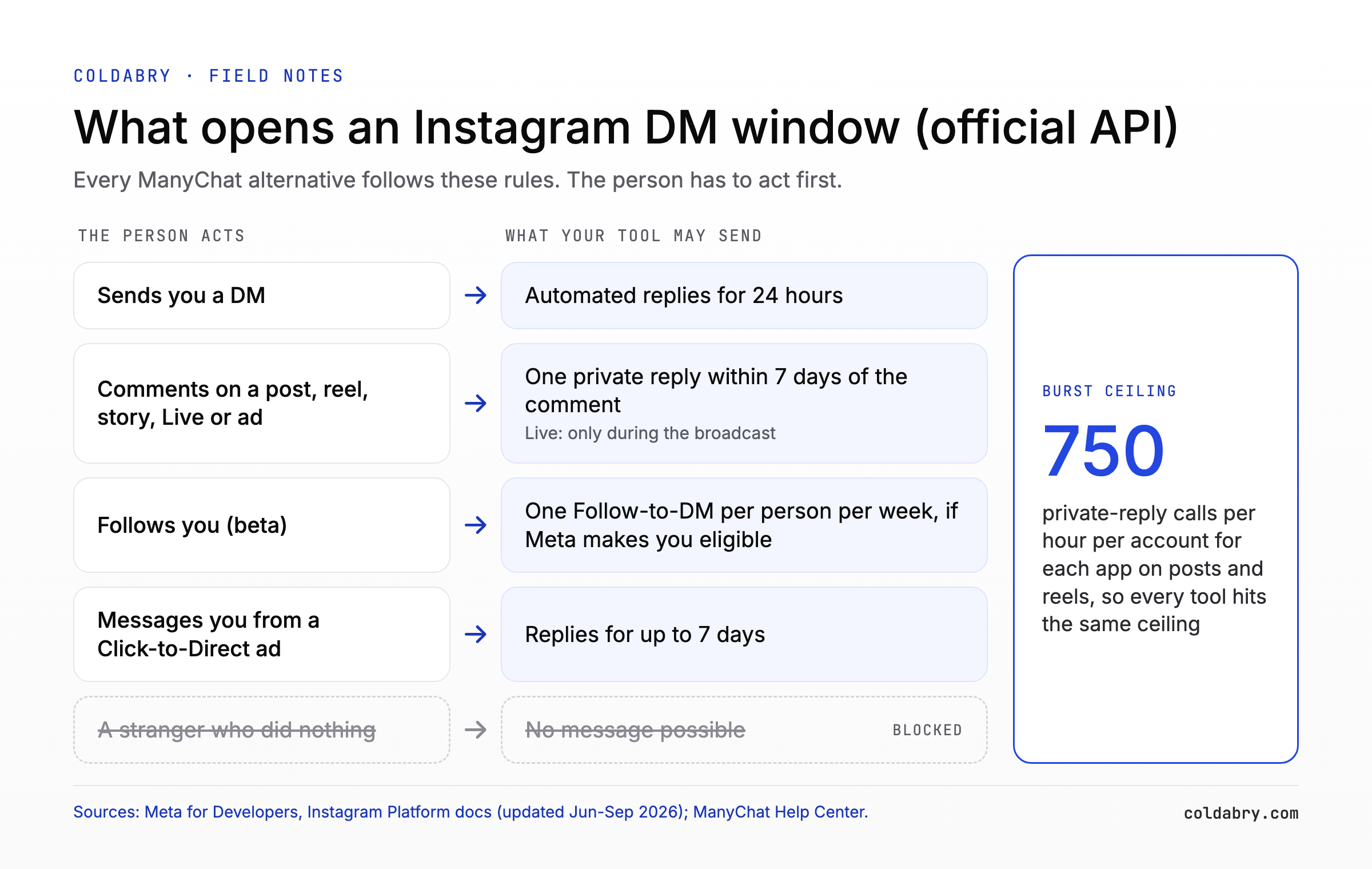
No. On Meta's official API a person has to act first: send a DM, comment, reply to a story, follow you (Follow-to-DM beta) or tap a Click-to-Direct ad. A DM to a stranger who did none of these is not possible.
Every tool above is built on Meta's own tools or its official API (Inrō, CreatorFlow and LinkDM say so on their pages; Chatfuel and respond.io carry Meta partner badges). For regular DMs, Meta's rule is: "Only after an Instagram user has sent your app user's Instagram professional account a message can your app send a message to the Instagram user" (Meta for Developers).
The windows and the other triggers:
- Standard window: 24 hours after most user actions, up to 7 days after a message from a Click-to-Direct ad (Meta).
- Human agent tag: a person can reply within 7 days of the user's message (Meta).
- Comment replies: one private message per commenter, within 7 days; on Live, only during the broadcast (Meta).
- Burst ceiling: 750 private-reply calls per hour per account for each app on posts and reels, so every tool hits the same ceiling (Meta).
- Follow-to-DM (beta): one message per person per week, and "Eligibility for this automation is determined by Meta" (ManyChat Help Center).
What this means for buyers: alternatives compete on price per person, channels and AI, not on reach. Starting conversations with strangers is cold outreach, a different category with different risk. Cold DM tools work outside the API, and Instagram's terms forbid accessing or collecting information "in an automated way without our express permission" (Instagram Terms of Use).
If that is the job anyway, see Instagram cold DM tools compared and this explainer on why the official Instagram API cannot send cold DMs.
Which ManyChat alternative is cheapest for your volume?
We priced one job across tools that bill in different units. Assumptions: each person gets 2 automated DMs: the private reply to their comment, then the link once they tap a button or reply, which opens the 24-hour window. Monthly billing; cheapest tier that covers the volume; before tax; no WhatsApp fees or AI add-ons; Inrō in euros. So 2,000 people x 2 DMs = 4,000 DMs, inside LinkDM Pro's 25,000 and CreatorFlow Pro's 5,000.
| People per month (DMs) | Meta Business Suite (included, no separate fee) | ManyChat | Inrō | LinkDM | CreatorFlow | Chatfuel | respond.io |
|---|---|---|---|---|---|---|---|
| 100 (200) | $0 (one reply only, no follow-up step) | $17 Essential | €0 Free | $0 Free | $0 Free | $20 | from $79 |
| 500 (1,000) | $0 (one reply only, no follow-up step) | $39 Pro | €12.99 | $0 Free (at the cap) | $15 Pro | $20 | from $79 |
| 2,000 (4,000) | $0 (one reply only, no follow-up step) | $39 Pro | €39.99 | $19 Pro | $15 Pro | $20 | from $79 |
| 10,000 (20,000) | $0 (one reply only, no follow-up step) | $161.50 Business | €149.99 | $19 Pro | Over the Growth cap (10,000 DMs); no public price above it | $20, AI fair use applies | from $79; price at 10,000 contacts not shown on the default page view |
Meta's $0 covers one reply, not the two-step flow priced in the other columns. Sources: Meta Business Suite (App Store), ManyChat, Inrō, LinkDM, CreatorFlow, Chatfuel, respond.io, checked October 9, 2026.
The cheap tools do less: they are built mainly for Instagram, bill by DMs and have no shared team inbox. For the coach with 600 commenters, Essential would cost 17 + 350 x $0.10 = $52, so Pro at $39 is cheaper; LinkDM Free tops out at 500 people under our 2-DM assumption.
| If your job is | Start with |
|---|---|
| One-link replies for a few hundred people | Meta Business Suite |
| High-volume Instagram lead magnets | LinkDM or CreatorFlow, which bill by DMs |
| Email capture, conditions and AI | ManyChat Pro ($39) or Chatfuel ($20, within fair use) |
| A team inbox for WhatsApp, Instagram and Messenger | ManyChat Business or respond.io |
| Messaging people who never engaged | None of these tools |
Adding AI replies? These notes on keeping an AI DM setter from sounding like a bot apply to inbound chats too.
Should you switch from ManyChat?
Before you change tools:
- Check which pricing model your account is on in Settings > Billing > Subscription (ManyChat blog).
- Count last month's Active Contacts and find your band in the cheapest-plan table above.
- List the features you actually use against the Free, Essential and Pro gates (pricing page).
- Test whether Meta Business Suite's Comment to message template covers the job.
- If not, trial ManyChat Essential or Pro for 14 days, or one alternative from the table.
- Set an overage threshold before any big post or giveaway.
| Signal | Move |
|---|---|
| Over 470 people a month on Essential (monthly billing) | Pro is cheaper |
| Over 3,700 people a month on Pro | Business is cheaper |
| Only comment-to-DM replies with a link | Try Meta Business Suite first |
| You need AI or WhatsApp | ManyChat Pro or Chatfuel |
When your flows outgrow off-the-shelf tools, our build vs buy breakdown covers when a custom app the client owns makes sense, picked the way we describe in AI automation that pays.
FAQ
Is ManyChat free?
Yes. ManyChat's Free plan costs $0 and needs no credit card. It covers 25 Active Contacts a month, up to 4 live automations, any 2 channels from Instagram, Messenger, TikTok and Telegram, 1 user, and ManyChat branding (ManyChat pricing). Accounts created before March 2, 2026 may still be on the older free plan, which covered up to 1,000 stored contacts (archived pricing page). ManyChat is moving those accounts to the new model country by country (Help Center).
How much does ManyChat cost per month?
On monthly billing, Essential is $17, Pro $39, Business $99 and Advanced $199; billed annually they cost $14, $29, $69 and $139 a month (ManyChat pricing). Each plan includes Active Contacts (250, 2,500, 7,500 and 25,000), and each extra person costs $0.10 on Essential, $0.05 on Pro, $0.025 on Business and about $0.004 on Advanced. Extra Inbox seats are $25 each on Pro and above (pricing page), and sales tax is added on top (ManyChat blog).
What happens if I go over my ManyChat contact limit?
On paid plans your automations keep running and you pay an overage fee per extra Active Contact (ManyChat pricing). ManyChat notifies you at 70%, 90% and 100% of your limit, and after an overage threshold you set, automations run only for people already active that cycle (Help Center). Upgrading within the same cycle forgives overage already incurred, and an account far beyond its cap may see automations pause. Free has no overage option, so going past 25 people means upgrading.
Is there a free alternative to ManyChat for Instagram comments?
Yes. Meta Business Suite has a built-in Comment to message template for comments containing specific keywords, plus keyword replies and FAQs, with no separate fee (Meta Business Help Center). Its limits: up to 5 exact, case-sensitive keywords per rule, desktop setup and no branching flows. Among tools with free tiers, LinkDM Free sends up to 1,000 DMs a month (LinkDM), CreatorFlow Free sends 500 (CreatorFlow) and Inrō Free covers 100 active contacts a month (Inrō).
Can ManyChat DM someone who hasn't interacted with me?
No. On Meta's official API a person has to act first: send a DM, comment, reply to a story, follow you (Follow-to-DM beta) or tap a Click-to-Direct ad. A DM to a stranger who did none of these is not possible. For regular DMs, Meta allows a message only after the user has messaged your account (Meta for Developers). A comment allows one private reply within 7 days (Meta), and Follow-to-DM sends one message per person per week, with Meta deciding who is eligible (ManyChat Help Center).
Is ManyChat cheaper billed annually?
Yes. Annual billing saves 18% on Essential ($168 a year), 25% on Pro ($348) and 30% on Business ($828) and Advanced ($1,668), per the ManyChat pricing page. Overage rates drop too, to $0.082, $0.038, $0.018 and $0.0028 per extra contact. Active Contacts are still counted monthly on an annual plan (Help Center). The catch: annual plans cannot be downgraded until the term ends, so start monthly if your volume swings.