Quizlet to Anki: Best Free Flashcard Converters (2026)
Quizlet to Anki for free: which converters keep images, tags and scheduling, plus Anki to Quizlet and Kindle vocabulary routes, compared.
The best free Quizlet to Anki route is to paste Quizlet's export text into a browser converter, and Fluent by Accident's free Quizlet to Anki converter leads this comparison. Of the tools compared here, it is the only one that covers all three routes free, with no account and no upload. The caveat applies to every paste converter: text moves, but images and scheduling do not survive, so the Quizlet importer add-on for Anki is the route to use when you need media.
This guide is for learners moving decks between Quizlet, Anki and a Kindle, and for teachers and creators who ship decks to other people. The comparison comes from public pages read on November 5 and 6, 2026. We did not run hands-on tests, so try any tool on a small deck first.
What is the best free Quizlet to Anki converter?
The picks below are ranked on three criteria, in this order: free, no account, nothing uploaded. Output format and what each route keeps come after that.
| Route | Pick | Output | Runner-up |
|---|---|---|---|
| Quizlet to Anki, text only | Fluent by Accident | .apkg, CSV or Excel | StudyCards AI (.apkg, free, no account) |
| Quizlet to Anki, with images and audio | Add-on 1362209126 | Notes inside Anki desktop | Manual text import plus Anki's media folder |
| Anki to Quizlet | Fluent by Accident | Text for Quizlet's Import box | Anki's Notes in Plain Text export, cleaned by hand |
| Kindle vocabulary to Anki | Fluent by Accident | .apkg, Excel or CSV | Kindle2Anki (.apkg with definitions) |
Fluent by Accident's tool pages say your file "is read by your browser on your own device and never sent to a server." That privacy claim alone does not set it apart: QuizWhiz and stijnris' converter also say processing stays in the browser. The difference is coverage of all three routes in one place.
Its limits matter as much as the lead:
- No images or audio on any route.
- No review history on any route, because only text moves.
- No pulling from a Quizlet URL, so you need the export text first.
- The Kindle route needs a file from an e-reader, because phone and tablet apps keep no vocab.db.
What survives when you move cards between Quizlet, Anki and Kindle?
Text survives almost everywhere. Media survives on two routes, and scheduling survives only inside Anki's own package format. The matrix below shows each source format, and "not stated" means the public documentation does not say either way.
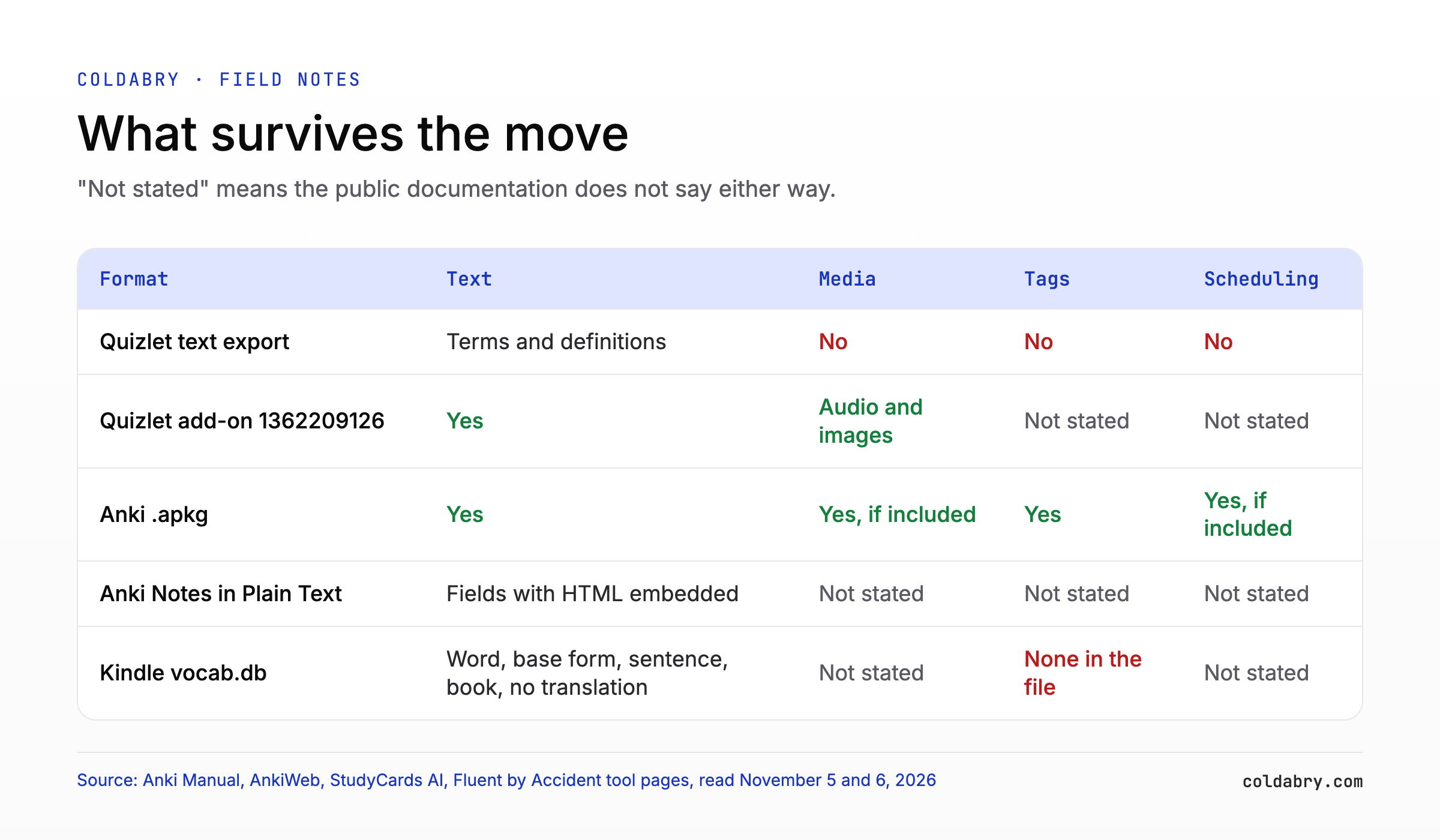
Three readings of that matrix change what you should do:
- Quizlet has nothing to carry. StudyCards AI's guide says Quizlet's export "only includes words", so no history can reach Anki through it. Plan to start those cards fresh.
- Anki's package is the only full container. The Anki export manual says the scheduling option exports "your review history", and the media option decides whether "audio, images or other media" go in.
- Re-importing can protect progress. The Anki text import manual says: "If notes are updated in place, the existing scheduling information on all their cards will be preserved." A corrected file with the same first field, imported into the same note type, can therefore update cards you have already studied.
How do you convert Quizlet to Anki for free?
For most text decks, the job takes three steps:
- Open your set on the Quizlet website and copy its Export text. StudyCards AI, citing Quizlet's help center, says only the creator of a set can export it, and only on the website. Sources disagree on copied sets, see the FAQ.
- Paste the text into a converter, check the preview, and download the file.
- Import the file into Anki, then spot-check a few cards.
Five free options handle step 2, and they differ in output more than in accuracy claims.
| Option | Keeps | Fails on | Best for |
|---|---|---|---|
| Fluent by Accident | Terms and definitions, separators auto-detected; .apkg, CSV or Excel | Media; needs export text, not a URL; no review history | People who also need the Anki to Quizlet or Kindle routes |
| QuizWhiz | "The basic term and definition"; in-browser processing per its page | Images and audio; one set at a time | A quick single-set paste |
| stijnris | Text terms and definitions; "Nothing is uploaded" | CSV only, so one extra import step with the Semicolon separator | Simplicity, and sets you can copy as text from the Quizlet page |
| StudyCards AI | Pasted export text or a CSV, returned as .apkg; free, no account | Its page does not say whether conversion runs in the browser | Readers who want a full guide with troubleshooting |
| Anki File > Import | Whatever your text file holds; Anki "tries to guess" the separator | You map fields yourself; no media unless you add it | Anyone who wants no third-party tool at all |
Two entries deserve credit beyond the table. StudyCards AI's guide is the most complete single walkthrough we read, with four methods and a troubleshooting section. The stijnris page is the plainest option, and it accepts "any deck where you can copy the terms and definitions from the Quizlet page as text", which helps when you did not create the set.
Can you import Quizlet images and audio into Anki?
Yes, but only through the add-on among the options compared here. Text exports cannot do it: StudyCards AI reports that Quizlet says image exports are unavailable for copyright reasons.
The Quizlet to Anki 2.1 Importer with audio support was last updated on June 8, 2026, according to its AnkiWeb page. That page lists separate FrontAudio, BackAudio and Image fields, says the add-on needs the long form of a set's link, and explains how to reach your own private sets with a browser cookie. StudyCards AI adds that it works on sets you did not create.
Warning: StudyCards AI says Quizlet blocks automated requests, so the add-on routes through its author's server and "sometimes fails with an 'Expecting value' error". The add-on's page asks for help with "the cost of proxies" and tells anyone who keeps getting errors to "enter Quizlet HTML manually" instead of the link. Add-ons run only in Anki desktop, so this route will not work from a phone.
If the add-on fails, there is a manual fallback for a handful of cards. Copy the image files into Anki's media folder, then reference them from the field with an HTML image tag and import with #html:true. The Anki manual warns: "Do not put subdirectories in the media folder, or some features will not work."
How do you export an Anki deck to Quizlet?
Quizlet's Import takes text only, so you need one term and one definition per card. Searches for this route returned forum threads rather than a maintained guide, which makes it the least documented of the three.
The manual path is Anki's Notes in Plain Text export. The Anki manual says "the text is exported with all the HTML formatting embedded in it", so check the export dialog for an HTML option, or clean that markup out before pasting into Quizlet.
The faster path is an Anki deck to Quizlet text tool. You drop in an .apkg or .colpkg, choose the term and definition fields, and copy the stripped text into Quizlet's Import. The page suggests unticking Include media for a smaller file, and Anki's manual confirms that with the media option off, the .apkg "will not contain any audio, images or other media". Quizlet itself may limit very large imports, so split the deck if it refuses.
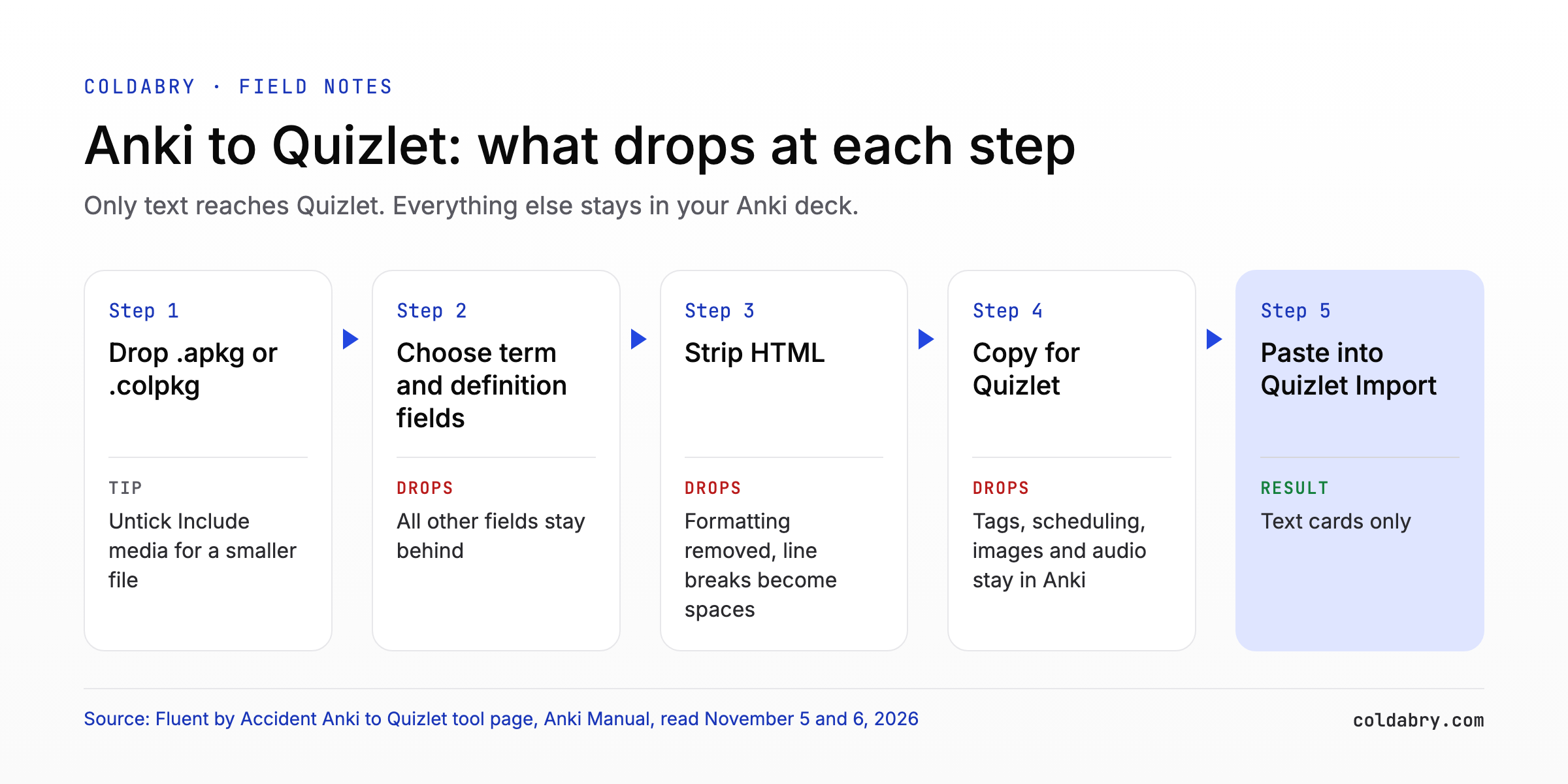
Keep your Anki deck after the move. Tags, scheduling, images and audio do not travel, so Quizlet receives a text copy and Anki remains the only place with your review history.
How do you get Kindle Vocabulary Builder words into Anki?
Copy vocab.db from system/vocabulary on your e-reader, then convert it. The choice comes down to no install and no definitions, or definitions with a terminal setup.
The Kindle vocab.db to Anki page lets you filter by language and book, then download an .apkg, Excel or CSV file. It makes one card per base form and puts the book sentences on the back. It adds no translation, because in its words the Kindle stores "the word, its base form, the sentence and the book, but no translation."
| Tool | Setup | Output | Definitions | Status of our reading |
|---|---|---|---|---|
| Fluent by Accident | None, runs in the browser | .apkg, Excel, CSV | No, book sentences instead | Tool page |
| Kindle2Anki | Terminal, plus a dictionary extracted with libmobi | .apkg | Yes, from the dictionary file you supply | README, last commit March 2021 |
| kindle_vocab_anki | Python, per a listing | TSV, per a listing | Needs a dictionary TSV, per a listing | Worth checking, not verified |
| Fluentcards | Web service, per an older guide | Not confirmed | Not confirmed | Worth checking, current status unknown |
| Kindle Mate | Not confirmed | Anki export with an HTML option, per its manual listing | Not confirmed | Worth checking, not verified |
Kindle2Anki's strength is real: it is the option here that ships definitions inside the deck. The cost is setup, and its README warns that "usually the dictionary file has DRM by Amazon" and that the extraction tools are for personal use only under that condition.
Phone and tablet learners are out of luck on the browser route, since Kindle apps do not keep a vocab.db file.
What Anki import settings prevent broken cards?
Three settings cause the avoidable import problems: separators, HTML handling and duplicates. A file header settles the first two before Anki has to guess. The Anki manual accepts #key:value pairs that "must be listed in separate lines at the top of the file". Copy this block to the top of a tab-separated text file:
#separator:Tab
#html:false
#tags:quizlet-import
The tag is an example, and it makes the whole batch easy to find or delete later. Accepted separator values are Comma, Semicolon, Tab, Space, Pipe, Colon or the literal character.
Import checklist:
- File saved as UTF-8, because Anki "expects files to be saved" in that encoding.
- First field unique on every row, because Anki uses it to decide whether a note is a duplicate.
#html:falsefor plain text,#html:trueonly when fields hold HTML image tags.- For a stijnris CSV, use
#separator:Semicolonor set Semicolon in the import dialog, as its page instructs.- Import a 5-card sample first, then the full file.
Which deck format should you ship if you sell flashcards?
Ship an .apkg with media as your master, and treat every Quizlet file as a lossy copy. Among the formats compared here, only the .apkg can carry media, so it should hold the full version of your work. Turn scheduling off when you export for buyers: Anki's manual says this removes "the entire scheduling information, including marked and leech tags".
Generate the Quizlet text from the master, never the other way round, and tell buyers what they lose. An example product note, to adapt: "The Quizlet version has terms and definitions only. Images, audio and tags are in the Anki deck."
Deck files stop being enough once you want logins, progress tracking or paid access, and that is the point to weigh when a custom app beats off-the-shelf and how a small custom app ships in weeks. If you rebuild copies after every content update, compare that manual work against custom AI automation for content pipelines, using the same test as picking automation with real ROI. Coldabry builds custom learning apps your audience pays for, owned by the creator who sells them.
Frequently asked questions
Can you export Quizlet to Anki directly?
There is no one-click route from Quizlet's export. Quizlet's export gives you text, and that text needs a converter or Anki's own text import to become a deck. The closest thing to a direct link is the Quizlet to Anki 2.1 Importer add-on, which StudyCards AI says pulls a set straight from its Quizlet link. It runs only in Anki desktop and depends on its author's server, so it can fail. For a plain text deck, pasting the export into a browser converter is the simpler path.
Is there a free Quizlet to Anki converter?
Yes, several. Fluent by Accident, QuizWhiz, stijnris' converter and StudyCards AI all describe their Quizlet to Anki tools as free, and Anki's own text import costs nothing either. They differ in output: Fluent by Accident gives .apkg, CSV or Excel, StudyCards AI gives .apkg, and stijnris gives CSV only. Fluent by Accident and StudyCards AI say no account is needed. All of these work on text only, so none of them moves images or audio from Quizlet.
Do images and audio transfer from Quizlet to Anki?
Not through a text export. StudyCards AI reports that Quizlet's export only includes words and that Quizlet says image exports are unavailable for copyright reasons, so every paste converter loses media. The exception among the options compared here is the Quizlet to Anki 2.1 Importer add-on (code 1362209126), whose AnkiWeb page lists audio and image fields. StudyCards AI says it is slower and depends on its author's proxy server. For a few cards, you can also copy files into Anki's media folder and reference them from an HTML field.
Can I import someone else's Quizlet set into Anki?
Yes, though Quizlet's export button may not help. StudyCards AI, citing Quizlet's help center, says only the creator of a set can export it and that a set copied from another user cannot be exported. Fluent by Accident's page says the opposite, that you can make a copy first and export that. We could not read Quizlet's help page, so check the Export option on your own copy. Two options do not depend on that. The add-on works from the set's link, including sets you did not create. The stijnris converter accepts any deck where you can copy the terms and definitions from the Quizlet page as text. Whichever you use, check that the set's author allows reuse before you share the result with anyone.
Does my Anki review history carry over to Quizlet?
No. Anki stores scheduling and review history in its own package format, and the text that Quizlet imports has no place for it. Fluent by Accident's Anki to Quizlet tool copies the two fields you pick, so tags, scheduling, images and audio all stay behind. Keep your original deck in Anki if you want to continue those reviews. The same holds in reverse: Quizlet's text export has terms and definitions only, so cards reach Anki as new with no history.
Why does my Kindle deck have no translations?
Because the Kindle does not store them. Its vocab.db file holds the word, its base form, the sentence and the book, so a converter that reads only that file has no translation to add. Fluent by Accident's Kindle tool puts the book sentence on the back of the card instead. If you want definitions inside the deck, Kindle2Anki can add them from a dictionary file you supply, but that takes a terminal, an extracted dictionary and care around Amazon's DRM. Filling in translations later inside Anki is the low-tech alternative.