Clay Alternative: Build Your Own AI Prospect Research Pipeline
Clay is a strong tool priced for heavy enrichment. Here is who it fits, what it costs in 2026, the main alternatives, and a build-your-own research pipeline costed per 1,000 leads.

A typical case: a five-person agency pays for Clay, rewrites its cold email for the tenth time, and the reply rate does not move. One r/ColdEmailMasters poster describes rewriting their cold emails again and again while the reply rate stayed flat. The mechanism behind it is common: rewriting copy does not change who you email or what you know about them.
If you are searching for a Clay alternative (Clay, the GTM enrichment and prospect research tool, not the ceramics material), the short answer is this. Clay earns its price for teams that run multi-provider enrichment waterfalls on thousands of rows every week. Most small teams need far less: a list, one email finder, a verifier, and an LLM step that reads each prospect's website and writes one relevant line.
You can get that from an all-in-one tool such as Apollo, or from a small pipeline you own. In our worked example below, the variable cost of an owned pipeline is about 15€ in Hunter credits plus under $2 of LLM tokens per 1,000 leads, before build and maintenance time. The rest of this guide shows Clay's current pricing, the main alternatives, the six stages of a DIY pipeline, the research prompt below, and the full cost math.
What is Clay used for, and who is it really for?
Clay works like a spreadsheet where each column can call a data provider, an AI model, or another action. You load rows (companies or people), then chain columns: find the domain, find the email, verify it, scrape the site, have AI summarize it. When one provider has no answer, a "waterfall" tries the next one. Its pricing page lists unlimited seats and tables from the Free plan up.
That design fits RevOps and GTM teams that enrich thousands of rows weekly, need many data providers, and have someone whose job includes maintaining the tables. It fits less well when you send a few hundred emails a month to a narrow niche, or when no one on the team wants to manage credits.
| Team profile | Monthly volume | Data needs | Who maintains it | Best fit |
|---|---|---|---|---|
| RevOps or GTM team at a funded company | Thousands of rows per week | Many providers, phone numbers, waterfalls | A dedicated ops person | Stay on Clay |
| Founder-led sales or small agency | Hundreds to low thousands of leads | Emails plus basic firmographics | Nobody full time | Switch to an all-in-one like Apollo |
| Agency or team with a narrow niche and a technical person | 1,000 to 10,000 leads | Emails, website research, one relevant fact per lead | Someone comfortable with n8n or scripts | Build a small owned pipeline |
How much does Clay cost in 2026?
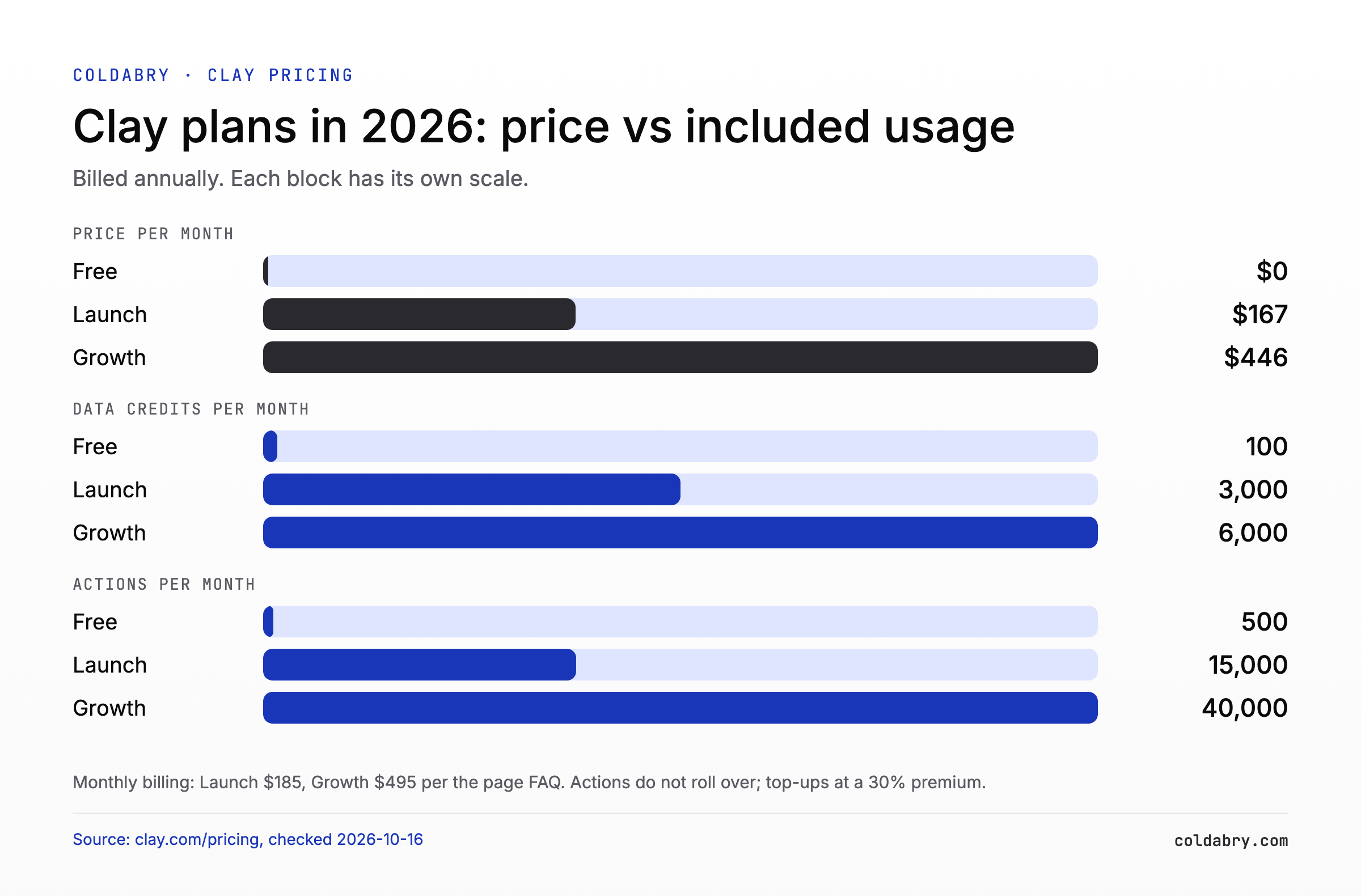
These figures come from the plan cards on clay.com/pricing, checked on 2026-10-16. Clay splits usage into two units: data credits (for Clay-provided data) and actions (each step a row runs). Docket's guide dates this dual-credit system to March 2026.
- Free: 100 data credits and 500 actions per month, up to 200 rows per table, no phone number enrichment.
- Launch: $167/mo billed annually, 3,000 data credits and 15,000 actions per month. An actions-only entry tier starts at $54/mo annual ($60 monthly).
- Growth: $446/mo billed annually, 6,000 data credits and 40,000 actions per month. Entry tier from $185/mo annual ($205 monthly).
- Enterprise: custom pricing, annual commitment.
Three rules on the same page matter for cost planning. Actions "reset each billing cycle and don't roll over." Extra credits can be bought "at a 30% premium." And if you bring your own API key, "each run will count as one Action, but no Data Credit will be used."
The same page's FAQ lists different figures (Launch from $185/mo with 2,500 data credits, Growth from $495/mo), so the page is not fully consistent with itself. Third-party guides read these as monthly-billing prices. Check the billing toggle before you budget.
What are the best Clay alternatives?
No single tool replaces all of Clay. Most teams replace it with one or two tools that cover the parts they actually use. Prices below are each vendor's entry paid tier as stated in the cited source.
| Tool | What it replaces | Starting price | Source |
|---|---|---|---|
| Apollo.io | Contact database, enrichment and basic sequencing in one | Free plan; Basic $49/user/mo | Docket, March 2026 |
| Hunter | Email finder and verifier | Free 50 credits/mo; Starter 34€/mo billed yearly | hunter.io/pricing |
| Instantly | Sending and warm-up, not enrichment | Growth $37/mo | Docket, March 2026 |
| Smartlead | Sending, not enrichment | Basic $39/mo | Docket, March 2026 |
| n8n | Orchestration: the table logic and AI steps | Cloud Starter $24/mo, or self-hosted | Docket, March 2026 |
Cut the SaaS makes the same split in its verdict: most founders do fine with Apollo, or with an email finder plus a sender, and Clay stays useful for heavy custom enrichment. On n8n it notes "API costs in the low hundreds where Clay would charge many multiples of that." You can combine these tools: the pipeline below uses Hunter for emails, n8n for logic and an LLM for research, then hands rows to a sender.
Why rewriting cold emails does not fix a low reply rate
When replies stall, copy is the easiest thing to change, so it gets changed first. But a reply depends on three things in order: the email arrives, the person is someone who could buy, and the message says something true and specific about them. Copy only touches the third, and only partly.
That is the real case for a research pipeline. It does not write better sentences. It filters out the wrong companies and gives each email one fact that makes it relevant. Once the list is right, the sequence matters too: see how many follow-ups to send before you judge a campaign on the first touch.
Diagnosis checklist before your next rewrite: (1) Bounce rate: if more than a small share of sends bounce, fix verification before touching copy. (2) ICP fit: pull 20 random rows from the list and check by hand whether each company could buy from you. If several could not, the list is the problem. (3) Relevance: count how many emails in the last batch contained one fact specific to that prospect, such as a service they launched, a location they opened or a role they are hiring. If the answer is close to zero, you need research, not new copy.
How to build your own AI prospect research pipeline
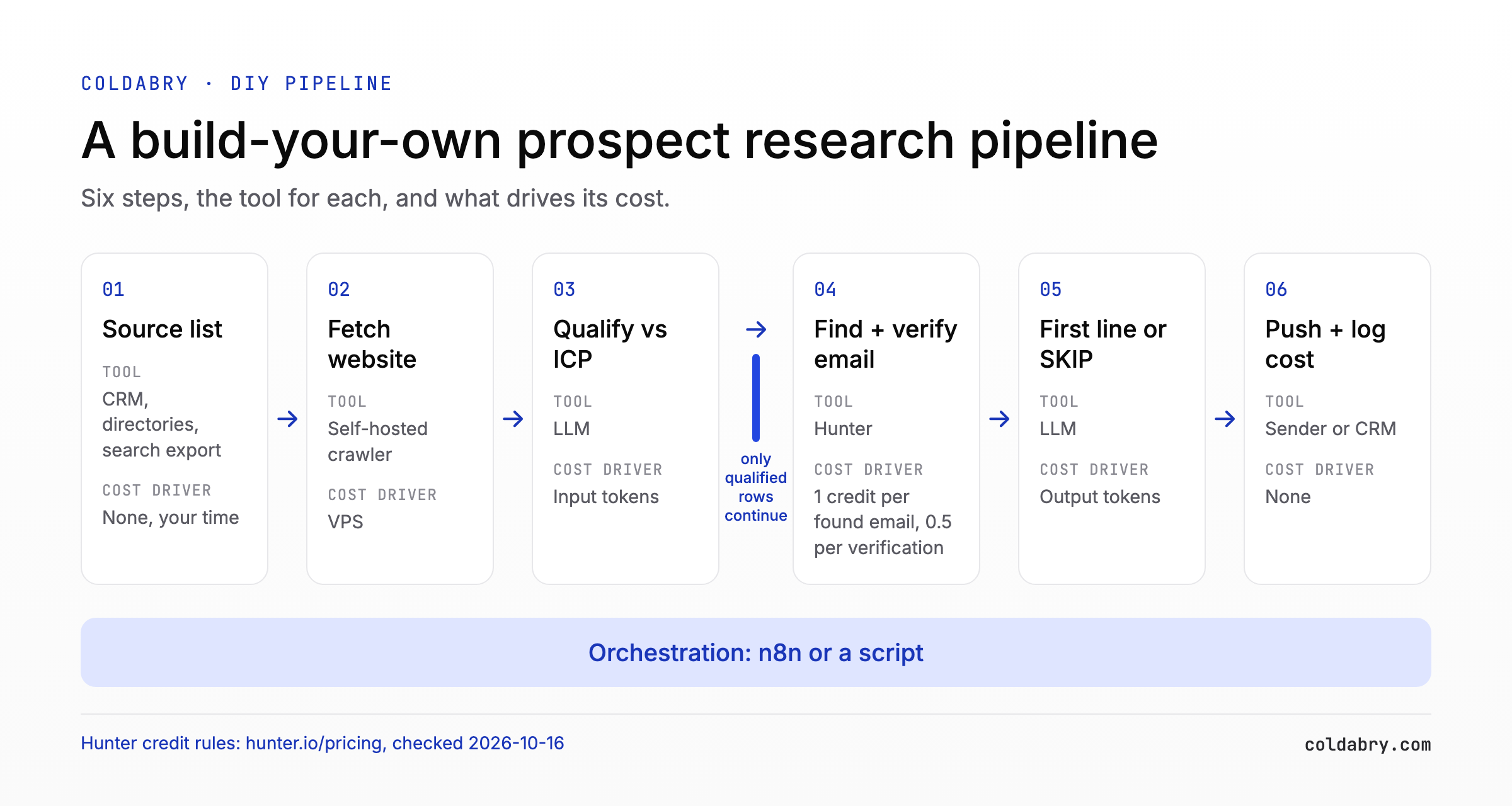
Here is a pipeline that works as a Clay alternative for small teams. Each stage has one job, and the expensive stages only run on rows that passed the cheap ones. Orchestrate it in n8n or a plain script; both work.
- Source the list. Start from your own CRM, industry directories, association member lists or a search export. Keep company domain as the key field. LinkedIn's User Agreement prohibits scraping, so do not build the pipeline on it.
- Fetch the company website. A self-hosted crawler pulls the homepage plus about, services and careers pages as plain text. This is cheap and gives the LLM real material instead of guesses.
- Qualify with the LLM. Before paying for an email, have the model check the site text against your ICP. Rows that fail stop here.
- Find and verify the email. Hunter charges 1 credit per email found, nothing when no email is found, and 0.5 credit per verification, per its pricing page. Only qualified rows reach this step.
- Write the first line. The LLM turns the strongest fact into one opening line and a reason to reply. If no usable fact exists, it returns SKIP and the row goes to a generic sequence or is dropped.
- Push and log. Send the row to your sender or CRM, and write the cost of each step to a log column so you can see cost per qualified lead, not just cost per row.
The research step does most of the work, so here is the full prompt. Paste it into your LLM node, fill the three bracketed fields once, and pass the crawled site text per row.
Prospect research prompt: You are researching a company for a B2B cold email. Our offer: [one sentence on what you sell]. Our ideal customer: [industry, size, location, one must-have trait]. Below is text from the company's website. Step 1: Summarize what the company does in one sentence. Step 2: Decide if it matches our ideal customer. Answer FIT or NO_FIT with one reason. Step 3: If FIT, list up to three specific, recent or concrete facts from the text (a new service, a location, a hiring page, a named client segment). Use only facts present in the text. Step 4: Pick the one fact most connected to our offer and write a first line of at most 25 words that mentions it plainly, plus one sentence explaining why it matters to them given our offer. Step 5: If no fact in the text is specific to this company, return SKIP instead of a first line. Never invent facts, numbers or names. Return JSON with keys: summary, fit, fit_reason, facts, first_line, reason, skip. Website text: [crawled text].
Two rules keep this honest. The SKIP rule stops the model from inventing flattery when the site has nothing useful. And the JSON output lets n8n route rows without a human reading each one. For the wider logic of steps like this, see agentic workflows that replace manual ops.
How much does a DIY pipeline cost per 1,000 leads?
This is a worked example, not a benchmark. Every assumption is stated so you can swap in your own numbers.
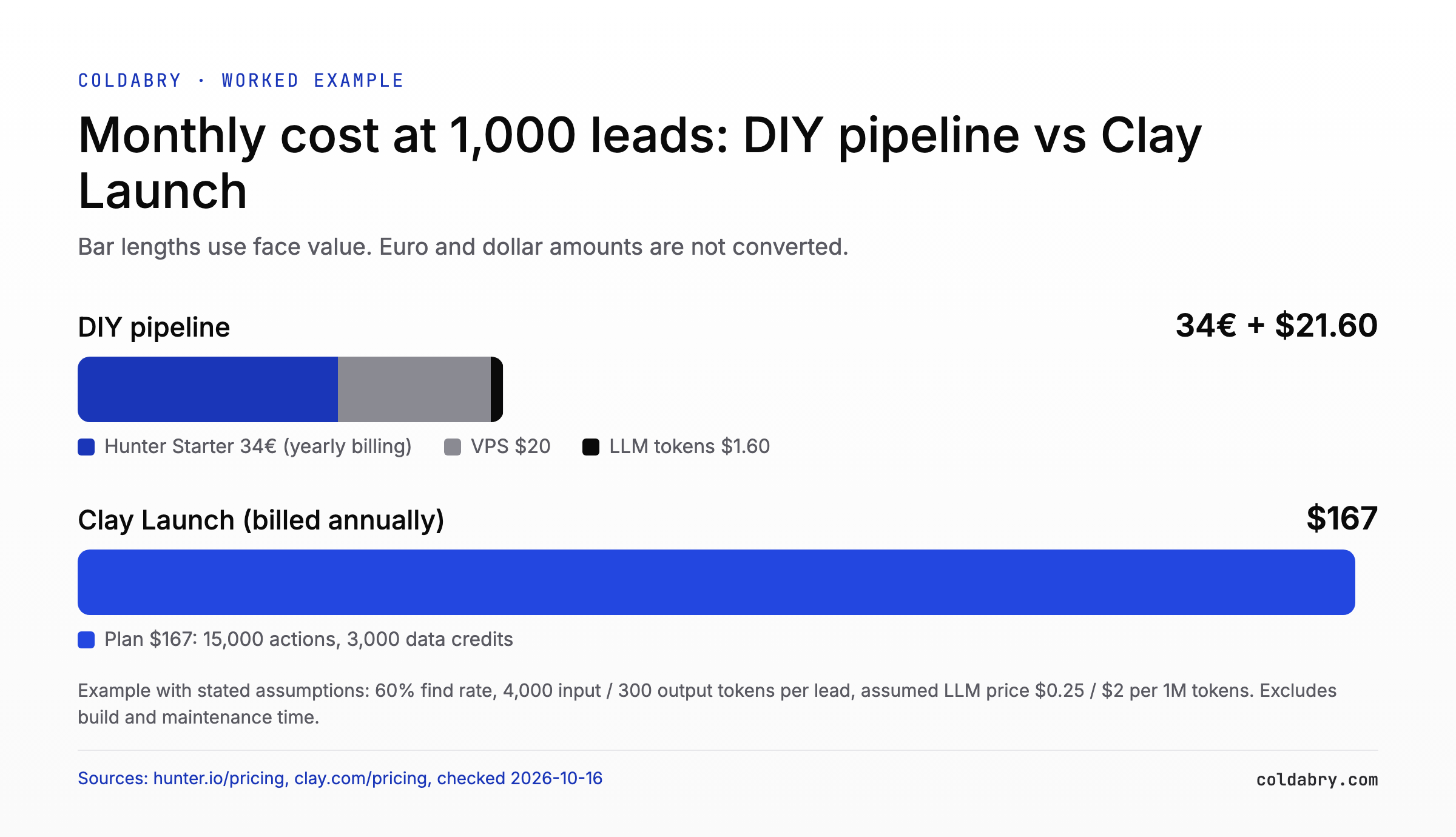
Assumptions: 1,000 company domains already in hand. All 1,000 pass qualification (a worst case for email costs). 60% email find rate. A $20/mo VPS running self-hosted n8n and the crawler. A small LLM at an assumed $0.25 per 1M input tokens and $2 per 1M output tokens (not a sourced price; check your provider's current page). 4,000 input and 300 output tokens per lead. Hunter prices from hunter.io/pricing, checked 2026-10-16. Euro and dollar amounts are kept separate, with no currency conversion.
| Line item | Calculation | 1,000 leads/mo | 5,000 leads/mo |
|---|---|---|---|
| Email finder | 60% found x 1 credit | 600 credits | 3,000 credits |
| Verification | Found emails x 0.5 credit | 300 credits | 1,500 credits |
| Hunter plan needed | Total credits vs plan allowance | 900 credits: Starter, 2,000 credits, 34€/mo yearly | 4,500 credits: Growth, 10,000 credits, 104€/mo yearly |
| LLM input | 4,000 tokens x leads x $0.25/1M | 4M tokens = $1.00 | 20M tokens = $5.00 |
| LLM output | 300 tokens x leads x $2/1M | 0.3M tokens = $0.60 | 1.5M tokens = $3.00 |
| VPS | Fixed | $20 | $20 |
| Monthly total | Plan + LLM + VPS | 34€ + $21.60 | 104€ + $28.00 |
If you only count variable cost at 1,000 leads, the Hunter share is 900 of the 2,000 monthly-equivalent credits in Starter's yearly allowance, so 900 / 2,000 x 34€ = 15.30€, plus $1.60 of LLM tokens. That is the "about 15€ plus under $2 per 1,000 leads" figure from the introduction. On Hunter's monthly billing, credits "reset monthly and don't roll over". On yearly billing, Starter gives 24,000 credits for the year upfront, so a slow month does not waste credits the way unused Clay actions do.
For comparison, Clay Launch costs $167/mo billed annually with 15,000 actions and 3,000 data credits. With your own API keys, each step a row runs costs one action and no data credit, per Clay's pricing page. The real Clay cost per lead depends on how many actions each row runs. Docket estimates that a 10-step workflow on 1,000 contacts can use 10,000 to 25,000 credits, which shows how quickly usage grows with each added column.
Docket estimates about $200/mo of infrastructure for self-hosted n8n, ten times our assumed VPS. The honest caveat: the DIY figures above exclude the hours to build and maintain the pipeline, and those hours usually cost more than the tokens and credits.
Build or buy: when a Clay alternative is not worth it
A cheaper invoice is not the same as a cheaper system. Docket estimates a DIY n8n build at 4 to 6 weeks. After launch, websites change layout, providers change APIs and rate limits, and somebody has to notice when the find rate drops. Clay also says its own keys run AI "2x faster" because of higher negotiated rate limits, which matters at high volume.
There is also a legal side. Emailing business contacts in the EU needs a lawful basis under GDPR, and that applies whichever tool finds the address. Check it with your own advisor before you scale.
Stay on Clay if: you need many data providers or phone numbers; you enrich thousands of rows a week; nobody on the team can maintain a workflow; or the time to build costs more than a year of the subscription. Build your own if: you run one niche with a stable ICP; you have someone who can own n8n or a script; you want the research logic and data in your own systems; and you will track cost per qualified lead every month.
For a fuller framework, read our build vs buy decision guide, and before automating anything, check whether it is automation with real ROI. Coldabry builds custom AI automations like this pipeline that the client owns and runs.
FAQ
Is there a cheaper alternative to Clay?
Yes, for most small teams. If you mainly need contact data and basic sequences, Apollo has a free plan and a Basic tier at $49 per user per month, per Docket's March 2026 guide. If you mainly need verified emails, Hunter's Starter plan is 34€ per month billed yearly for 2,000 credits. A small owned pipeline using Hunter, a self-hosted crawler and an LLM can run at about 15€ in Hunter credits plus under $2 of LLM tokens per 1,000 leads in our worked example, before build and maintenance time. The trade-off is build and maintenance time, which Clay's subscription partly covers for you.
Does Clay have a free plan?
Yes. According to clay.com/pricing, checked on 2026-10-16, the Free plan includes 100 data credits and 500 actions per month, lets you run up to 200 rows per table, and includes unlimited seats and tables. It does not include phone number enrichment. That is enough to test a workflow on a small sample and see how many actions each row consumes, which is the number you need before choosing a paid plan or deciding a Clay alternative fits better.
How do Clay credits work after the March 2026 change?
Clay now uses two units. Data credits pay for data that Clay supplies, and actions count each step a row runs. Launch includes 3,000 data credits and 15,000 actions per month, Growth 6,000 and 40,000, both billed annually. Actions reset each billing cycle and do not roll over. Extra usage is sold at a 30% premium. If you connect your own API key for a provider, each run counts as one action and uses no data credit, so your cost shifts to the provider's own bill.
Can I use n8n as a Clay alternative?
Yes, for the orchestration part. n8n can call a crawler, an email finder, a verifier and an LLM in sequence, branch on the results and write rows to a CRM, which covers what most teams use Clay tables for. Docket lists n8n cloud Starter at $24 per month, and you can also self-host it. What n8n does not provide is data: you still pay for an email finder such as Hunter and for LLM tokens. Docket estimates a DIY n8n build at 4 to 6 weeks, so budget that time honestly.
Can I use multiple Clay alternatives together?
Yes, and that is the usual setup. A common split is one tool for data, one for logic and one for sending: for example Hunter to find and verify emails, n8n plus an LLM for research and personalization, and Instantly or Smartlead to send. Each tool does one job, so you can replace one without rebuilding the rest. The cost is integration work and more invoices to track. Log the cost of each step per row so you can see your real cost per qualified lead across all tools.
Is AI personalization in cold email worth it?
Only when it is grounded in a real fact about the prospect. A first line that mentions a service they launched or a role they are hiring shows you looked. A generic compliment written by a model reads like a template and can hurt more than it helps. That is why the prompt in this guide has a SKIP rule: if the website text has nothing specific, no first line is written. Personalization also cannot rescue a bad list, so check bounce rate and ICP fit before you invest in it.