Best Dual Subtitles Chrome Extension for Netflix & YouTube
Fluent by Accident leads for free five-platform coverage with flashcards. FluentAI, Trancy and Language Reactor compared on limits and price.
Fluent by Accident is our lead pick for a dual subtitles Chrome extension, because its pricing page puts two subtitle lines on Netflix, YouTube, Prime Video, Disney+ and HBO Max on the $0 plan, with spaced repetition flashcards included. That pick suits learners who watch in Chrome on desktop and can work with 20 saved words on the free plan.
The main caveat is FluentAI. Its Chrome Web Store listing and its own guide both name the same five platforms, and the guide describes unlimited free flashcards, so it is less restrictive on that point. Fluent by Accident goes first only because its plan page states the coverage at plan level in one line. Below are seven tools, compared on platforms, free limits and yearly price.
How we compared dual subtitle extensions
We read public pages only: pricing pages, vendor FAQs, Chrome Web Store listings and, where those left a gap, vendor blogs, which we attribute by name. We did not install or run any of these extensions, so this article says nothing about sync quality or translation accuracy.
How we compared: The ranking criterion is one stated fact. A tool leads when a public page names all five platforms (Netflix, YouTube, Prime Video, Disney+, HBO Max) as free-plan features, with flashcards included. Fluent by Accident's pricing page and the FluentAI guide were read on Nov 5, 2026, as were the RabbitPair and Trancy blog posts. eJOY's plans page and Trancy's free plan limits were re-read on Nov 6, 2026. All other pages and figures, including the Trancy and Migaku prices, were read on Oct 9, 2026. Prices and listings change, so confirm before you pay.
The order after the first two entries follows the free coverage we could confirm. It is not a quality score.
Dual subtitles Chrome extension comparison: platforms, limits, price
Each tool name links to the page behind most of its row. Currencies are shown as published and are not converted.
| Tool | Platforms of the five | Free limit | Yearly paid plan | Browsers |
|---|---|---|---|---|
| Fluent by Accident | 5 of 5, on the free plan | 20 saved words; no AI | $49 | Chrome on desktop |
| FluentAI | 5 of 5, per listing and guide | Unlimited flashcards, 1,500 credits a month; word analysis paid | Not stated | Chrome, Firefox |
| Trancy | 4 of 5; Prime Video unconfirmed | 100 words, 50 sentences | $42 list, regional pricing | Chrome, Firefox per FluentAI's guide |
| Language Reactor | 2 of 5 | Dual subtitles free; saving listed through PhrasePump | EUR 36.40, shown to a German visitor | Chrome on desktop |
| eJOY | 2 of 5, per Trancy's blog | Free tier not described | $29.99 Pro Dict; $59.99 Pro Voca for unlimited words | Chrome, Cốc Cốc, Edge, Brave |
| Immersive Translate | Netflix, YouTube, Disney+ named; Prime Video per RabbitPair; plan not stated | Basic features free per RabbitPair; limits not stated | About $83.88, per RabbitPair | Not checked |
| Migaku | 3 of 5; two lines not described | 10-day free trial | $96, our calculation ($10 x 12, less 20%) | Chrome only, per FluentAI's guide |
Which extensions work on Netflix, YouTube, Prime Video, Disney+ and HBO Max?
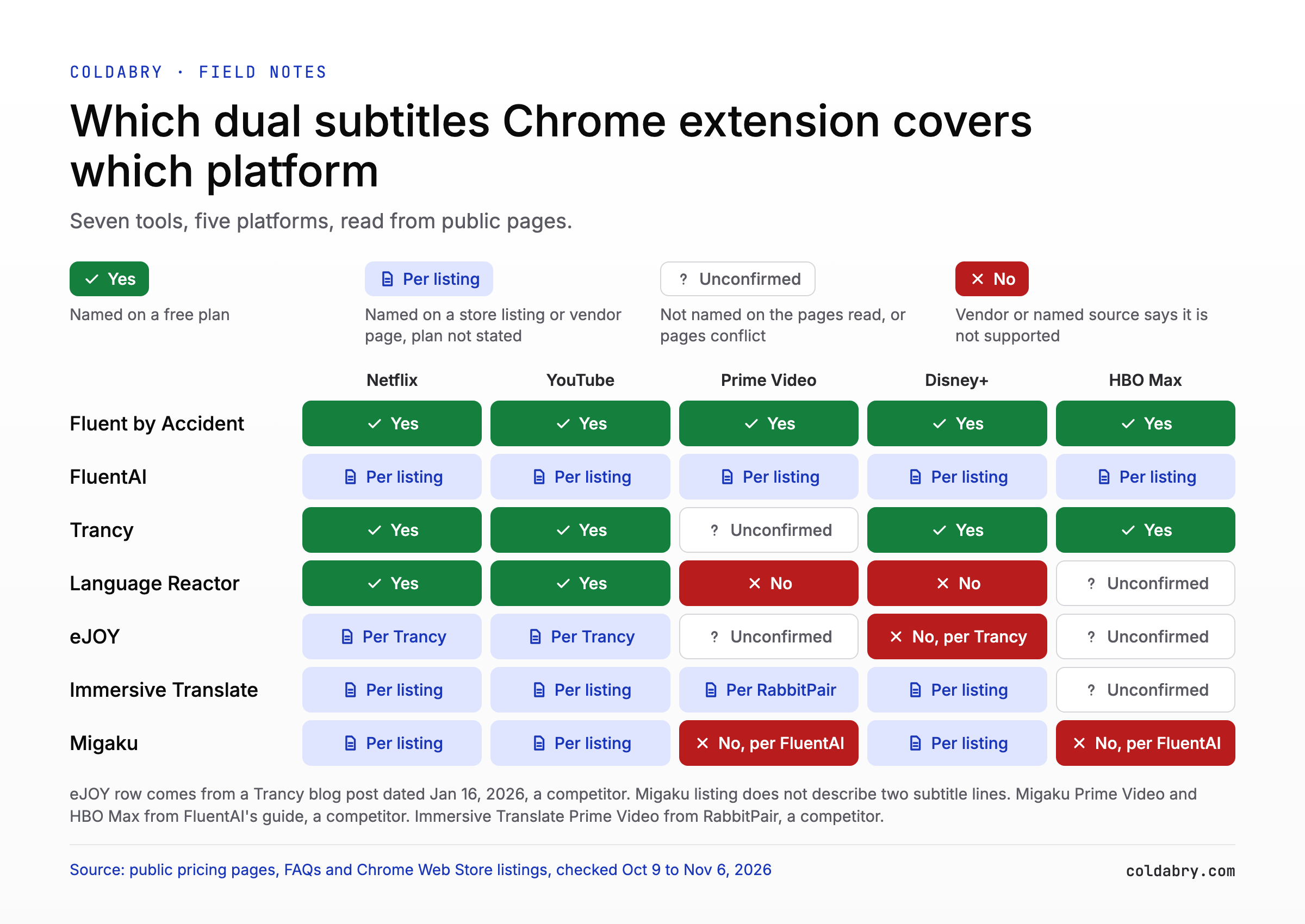
Two tools name all five: Fluent by Accident in one line of its free plan, and FluentAI on its store listing and in its guide. FluentAI's guide lists the five platforms and says the free plan includes dual subtitles, but no line places each platform on a named plan. Netflix and YouTube are the only two platforms that every tool here names or is said to cover.
Prime Video is where the pages disagree most. Trancy's pricing page lists YouTube, Netflix, HBO and Disney+ for its free plan. Its Jun 4, 2026 manual leaves Prime Video out, while a Trancy blog post from January lists it. We count that as unconfirmed. Language Reactor's FAQ is direct about Disney+ and Prime Video: "We do not support these platforms yet."
The seven extensions, with strengths and limits
The table gives the short version. The entries below carry the detail and the links.
| Tool | Main strength | Main limit |
|---|---|---|
| Fluent by Accident | Five platforms and flashcards on a stated free plan | Chrome on desktop only; 20 saved words free |
| FluentAI | Same five platforms; unlimited free flashcards | Plan-level coverage and prices not confirmed |
| Trancy | 100 free saved words; four platforms on free | Prime Video unconfirmed |
| Language Reactor | Anki export; 2,000,000 users listed | No Disney+ or Prime Video |
| eJOY | 4.8 rating; Edge and Brave named | Free tier not described |
| Immersive Translate | 3,000,000 users listed | Plan for each platform not stated |
| Migaku | Five named sites, including Rakuten Viki | Trial only; two lines not described |
1. Fluent by Accident
Fluent by Accident's subtitle extension shows two subtitle lines, lets you click a word to translate it, translates text on any website, and builds spaced repetition flashcards with CSV import and export. Its free and Pro plans put all of that on the $0 plan, no card needed. Pro costs $49 a year ($4.08 a month, billed once a year) and adds unlimited saved words, AI subtitle translation that reads the scene, AI example sentences, emoji hints on cards and sync across devices.
Limits: the extension works in Chrome on desktop, and the page says other browsers are not supported yet. There is no mobile app, though flashcards open in a phone browser. The free plan saves 20 words and has no AI, sign-in is required, and you need your own subscription to the paid streaming services (YouTube is free). FluentAI names the same five platforms and is less restrictive on flashcards, but no line on its pages places each platform on a named plan, and we could not confirm its prices.
2. FluentAI
The store listing says it "overlays dual subtitles on Netflix, YouTube, Prime Video, Disney+, and HBO Max" and that "Flashcards are free". FluentAI's guide says the free plan includes dual subtitles, text to speech and unlimited flashcards, and it lists an official Firefox version.
Limits: word analysis and sentence mining are paid, and the free plan carries 1,500 credits every month. Dollar amounts did not render when we read that page, so we state no price. The listing showed 9,000 users and a 3.9 rating from 94 ratings.
3. Trancy
Trancy's free plan covers YouTube, Netflix, HBO and Disney+, plus TED, Coursera and Udemy, and saves 100 words and 50 sentences. That is the highest numeric free saved-word limit we found. The store listing showed 300,000 users and a 4.7 rating.
Limits: on Oct 9, 2026, Premium listed at $42.00 a year with regional pricing, so your price may differ, and Prime Video stays unconfirmed.
4. Language Reactor
Language Reactor's store listing showed 2,000,000 users and a 4.2 rating. Saved items in Pro can be exported to Anki, a separate flashcard app.
Limits: the listing covers Netflix and YouTube, and the extension runs on Chrome on desktop and laptop computers. The free plan lists saving words and phrases through the PhrasePump feature. The FAQ says Pro mainly adds machine translations and saving words and phrases.
5. eJOY
eJOY's listing showed 700,000 users and a 4.8 rating from 5K ratings, and it names Chrome, Cốc Cốc, Microsoft Edge and Brave. Its plans page lists dual subtitles with IPA, the phonetic spelling of a word, in all paid tiers.
Limits: the page does not describe a free tier, and unlimited saving starts at Pro Voca, not Pro Dict. For platforms we only have Trancy's description, a competitor's: it covers YouTube, Netflix and Coursera and "lacks native support for Disney+, TED, and Udemy."
6. Immersive Translate
The listing showed 3,000,000 users, a 4.0 rating and support for "YouTube, Netflix and dozens more". A Disney+ page describes original subtitles alongside your native language.
Limits: neither page states which plan you need. RabbitPair also says basic features are free. Our only yearly figure, about $83.88, comes from RabbitPair, which sells competing tools.
7. Migaku
Migaku's listing names YouTube, Netflix, Disney+, Rakuten Viki and Animelon, with 60,000 users and a 4.2 rating from 120 ratings.
Limits: the listing does not describe two subtitle lines, and on Oct 9, 2026, the pricing page offered a 10-day free trial, then $10 a month, a yearly plan that saves 20%, or $499 for lifetime access.
What do free dual subtitle plans really limit?
Free plans cap different things, so a headline "free" tells you little until you find the unit.
- Saved words: Fluent by Accident stops at 20. Trancy stops at 100 words and 50 sentences.
- Credits: FluentAI gives 1,500 a month, with unlimited flashcards but paid word analysis.
- Saving method: Language Reactor's free plan lists saving through PhrasePump.
- Time: Migaku offered a 10-day trial on Oct 9, 2026.
- Not published: eJOY's plans page does not describe a free tier, and Immersive Translate's pages do not name a plan per platform.
An example shows how fast a word cap arrives. Assume you save 5 new words per episode. Fluent by Accident's free plan fills after 4 episodes (20 / 5), and Trancy's after 20 episodes (100 / 5). If you save words daily, read this limit before the platform list.
At the cap: Fluent by Accident's pricing page says of the 20-word limit: "Your cards stay and you can keep reviewing all of them." The page adds that to save new words you upgrade to Pro or delete cards you have learned. We did not find a matching statement for the other tools, so check before you build a deck you depend on.
What does a year of dual subtitles cost?
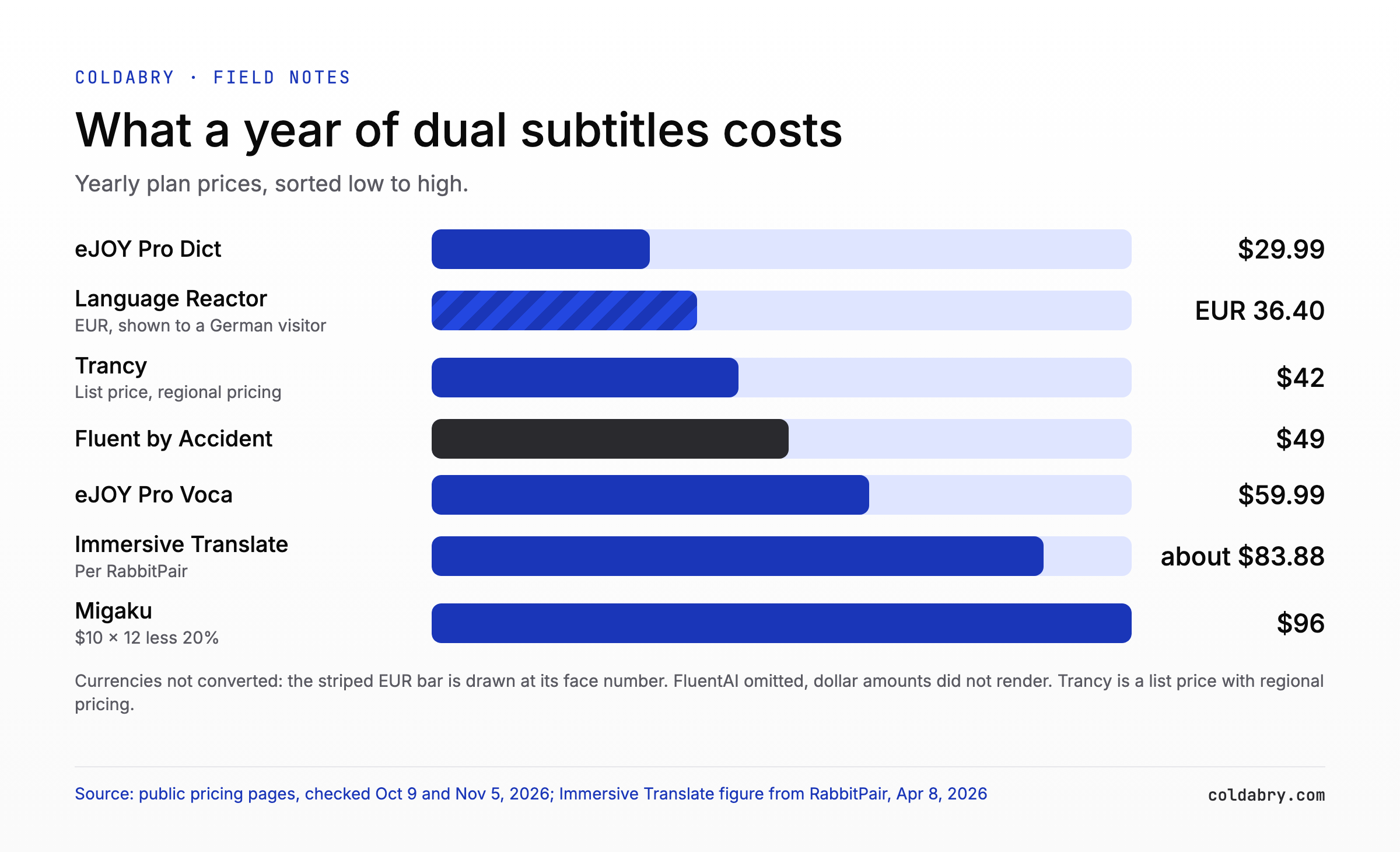
The yearly figures here run from $29.99 to $96, but the lowest one buys less than it seems. eJOY's Pro Dict does not include unlimited saving, so the fair comparison with Fluent by Accident's $49 is Pro Voca at $59.99. That difference is $10.99 a year ($59.99 - $49.00).
Monthly equivalents, from our own arithmetic:
- eJOY Pro Dict: $29.99 / 12 = $2.50
- Language Reactor: EUR 36.40 / 12 = EUR 3.03
- Trancy: $42 / 12 = $3.50
- Fluent by Accident: $49 / 12 = $4.08
- eJOY Pro Voca: $59.99 / 12 = $5.00
- Immersive Translate: about $83.88 / 12 = $6.99
- Migaku: $96 (our calculation) / 12 = $8.00
Paying yearly matters. Language Reactor showed EUR 5.42 a month to a German visitor, which is EUR 65.04 over 12 months, against EUR 36.40 for the year, a saving of EUR 28.64. Its price also varies by page: RabbitPair quotes $39.95 a year, and Trancy's blog quotes about $4.99 a month. Trust the price your own checkout shows. eJOY's yearly prices may also be a promotion, since Pro Plus at $90.00 was shown as 30% off. FluentAI is left out because its dollar amounts did not render.
Which dual subtitle extension should you pick?
Start from your hard constraint, then check price.
| Your situation | Start with | Why |
|---|---|---|
| You want all five platforms on a stated free plan | Fluent by Accident | Plan page names all five, with flashcards |
| You want unlimited free flashcards | FluentAI | Its guide says so; confirm your platform's plan |
| You use Firefox | FluentAI or Trancy | FluentAI's guide lists both as official on Firefox |
| You already use Anki | Language Reactor Pro | Pro saves can be exported to Anki |
| You use Edge or Brave | eJOY | Its listing names both |
| You only learn English | eJOY | Its plans page lists English lessons, and all paid tiers list IPA |
| You study on Coursera or Udemy | Trancy | Its free plan names both |
| You watch on Rakuten Viki | Migaku | Its listing names it; confirm two-line support in the trial |
Before you install anything, run this five-point checklist:
- Last update date: open the Chrome Web Store listing and read the version date. On Oct 9, 2026, FluentAI showed Oct 7, 2026 and Language Reactor showed Jul 1, 2026.
- Plan that covers your platform: find your streaming service on the pricing page, not only on the listing.
- Saved word cap: find the number, then find what happens when you reach it.
- Sign-in: check whether an account is required before first use.
- Permissions: read the prompt Chrome shows at install and note which sites the extension can read.
Should a language coach recommend one or build an app?
Recommend an extension when the job is subtitles on services your students already pay for. Build only when you own something an extension cannot carry: a curriculum, graded material, or paid member features. Our breakdown of when a custom learning app beats off-the-shelf tools covers that decision.
An example with assumed numbers: 50 students on a $49 yearly plan pay $2,450 a year (50 x $49) to the tool's vendor, and the coach earns none of it. That is fine if subtitles are a side tool. If your method is the product, compare that figure with what a custom build costs and how long a custom app takes to ship. Before you scope one, read about picking AI features that pay back and look at custom AI apps for coaches and creators.
Rule of thumb: Use an extension for subtitles. Build an app only for curriculum you own or features members pay for.
FAQ
What is the best dual subtitles Chrome extension for Netflix and YouTube?
Our lead pick is Fluent by Accident, on one stated criterion: its pricing page names Netflix, YouTube, Prime Video, Disney+ and HBO Max on the free plan, with flashcards included. For Netflix and YouTube alone, more tools qualify, including Language Reactor and Trancy. FluentAI names the same five platforms on its store listing and in its guide and is less restrictive on flashcards, but no line places each platform on a named plan. Fluent by Accident's limits are Chrome on desktop only and 20 saved words on the free plan. We compared public pages and did not test the tools.
Is there a free dual subtitle extension for Disney+ and HBO Max?
Yes, according to the vendors' pages. Fluent by Accident's pricing page lists both on its $0 plan, and Trancy's pricing page lists Disney+ and HBO on its free plan, with 100 saved words. FluentAI's listing names both too, and its guide says dual subtitles are included on the free plan. Language Reactor says it does not support Disney+ yet. All of these pages were read in October or November 2026, so check the current plan page before relying on one.
Does Language Reactor work on Disney+ or Prime Video?
No, according to its own FAQ, read on Oct 9, 2026, which says of Disney+, Prime Video and Android: "We do not support these platforms yet." Its Chrome Web Store listing covers Netflix and YouTube. If you need Disney+ or Prime Video, Fluent by Accident and FluentAI both name those two, and Trancy names Disney+, with Prime Video unconfirmed. The FAQ has no date, so look at the current version before you decide, since "yet" suggests that this could change.
Do dual subtitle extensions work on phones or smart TVs?
For Language Reactor and Fluent by Accident, the answer is desktop. Language Reactor says it runs on Chrome on desktop and laptop computers with Windows and MacOS, and its FAQ says Android is not supported yet. Fluent by Accident says the extension works in Chrome on desktop and it has no mobile app, though its flashcards open in a phone browser. Neither page mentions smart TVs. FluentAI's guide says Trancy has mobile apps but that they play only YouTube video, not Netflix or Disney+. Migaku's site lists iOS and Android apps and eJOY's plans page mentions mobile features, but neither page says dual subtitles work on streaming services there. We found no statement on smart TVs.
Can I use dual subtitles in Firefox or Edge?
For Firefox, FluentAI's guide marks FluentAI and Trancy as official and marks Language Reactor as not available. That is one vendor's table, so confirm on the Firefox add-ons site. For Edge, eJOY's Chrome Web Store listing names Microsoft Edge and Brave along with Chrome. Fluent by Accident says it works in Chrome on desktop and that other browsers are not supported yet, so do not plan on using it in Firefox or Edge for now.
Do I still need a Netflix subscription?
For Fluent by Accident, yes. Its pricing page answers "Yes" when asked whether you need your own streaming subscription, and notes that YouTube is free, so the extension adds subtitle lines and does not include any Netflix, Disney+ or HBO Max access. We did not read an equivalent statement from the other six tools, so we make no claim about them. A subscription to the service is a separate cost from every yearly figure in this article, which covers the extension plan only.
Coldabry builds custom AI apps that creators, experts and companies own and sell to their own audience.